FIBER OPTIC CONNECTORS: THEN VS. NOW

by http://www.fiber-mart.com

Finding the right fiber optic connector for an application used to be a straightforward choice based on what was available, but now the number of fiber connectors on the market can be paralyzing. Design and performance improvements have resulted in a proliferation of styles and types of fiber optic connectors. Many fiber connectors currently on the market provide a wide range of terminal-to-terminal solutions, many of which can be terminated in the field.
Old style fiber optic connectors like the Biconic are now obsolete, but they were cutting edge technology. AT&T derived the name Biconic from a conic-shaped ferrule centered around the fibers. Metal SMA connectors were the only choice for connecting multimode fibers until Japanese engineers developed ceramic ferrules.
Soon D4 and FC connectors used built-in keys as optical coupling repeaters with FC/PC and FC/UPC receptors. The ST bayonet-style connector followed quickly. SMA fiber connectors are declining in popularity, but ST fiber connectors are still industry standards. The Fiber Optic Association has a detailed history of connectors if you want a trip down memory lane.
CURRENT FIBER OPTIC CONNECTORS
Most optical fiber connectors on the market today have LC duplex ports or MPO multi-fiber ports. The twin advantages of small size and high-density patching make them indispensable in most data centers using 40 GBPS or 100 GBPS broadband. Now you can choose between MXCs and PRIZMs with laser lenses instead of physical connectors.
CHOOSING THE RIGHT FIBER CONNECTOR
STEP ONE: NARROW YOUR CHOICE BASED ON THE APPLICATION
One way of finding the right fiber connector is to eliminate the ones you that won’t work, giving you a smaller set of choices to compare.
What type of hardware are you connecting?
Do you need connections at each end?
What about data transmission speeds, distance, and total connections?
Your insertion loss (IL), return loss (RL), and standards requirements will guide your decision about both the equipment and fiber connectors needed for your application. Next, decide whether or not to use pre-terminated cables based on your optical transceiver modules and bulkhead receptacles.
STEP TWO: NARROW YOUR CHOICE BASED ON THE OPERATING ENVIRONMENT
Your application’s operating environment is an essential factor in choosing a fiber optic connector. The environmental conditions, type of fiber, cable construction will limit the choices available. For example, field terminations are more demanding in extreme environments so a pre-polished connector is a better choice. The cable diameter will limit your options of jackets. Mechanical connectors are far more convenient that polishing in the field, but they have a limited range of operating temperatures. Adhesive fiber connectors need to be polished in the field for optimal performance, so they are a good choice if you are operating in a data center or any other reasonably accessible environment. Or you can challenge your skills with a Fusion Splice Connector for precision fitting.
STEP THREE: FINALIZE YOUR LIST BASED ON LIFE EXPECTANCY
You probably considered the life expectancy of your application when you set up your fiber network. A system built to last 30 years will be very different from the one you only need for a few months. Most cable systems fail at the connections, not the fiber itself. Fiber connectors show a decrease in performance after cleaning, repetitive mating and demating, and scratching. Polished fiber connectors often have a lifetime warranty, so check manufacturer’s websites. Pre-polished connectors have a shorter lifespan. Whichever type you choose, training your technicians to clean fiber connectors properly, unplug using the pulling grip instead of the connector, and dusting during mating extend the life.
CONCLUSION
There are many choices for fiber connectors on the market, but you can find the best match for your application by methodically narrowing down the options based on your application needs and operating environment. This will result in a limited list that you can reasonable research on manufacturer and review websites.
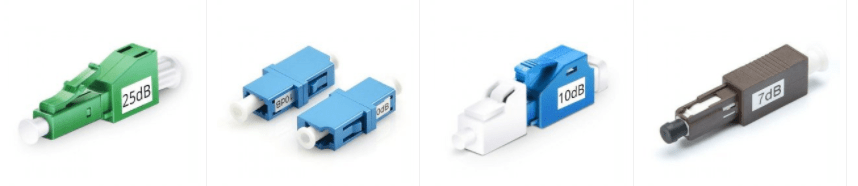
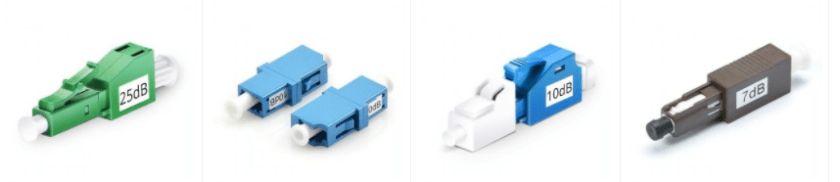
Introduction of Fiber Optic Attenuators

Do you know what is the fiber attenuator used for? As we know, the source of the single mode fiber is laser, the power of which is extremely strong. Therefore we can use single mode fiber to achieve long distance transmission. But, if the transmission distance over single mode fiber is too short, too much light may overload a fiber optic receiver, which may cause serious high bit error rates. How to solve this?

Do you know what is the fiber attenuator used for? As we know, the source of the single mode fiber is laser, the power of which is extremely strong. Therefore we can use single mode fiber to achieve long distance transmission. But, if the transmission distance over single mode fiber is too short, too much light may overload a fiber optic receiver, which may cause serious high bit error rates. How to solve this? Fiber attenuator should be inserted at the receiver end to reduce the power to the proper level. This article sheds light on types, and applications of optical attenuators, helping you to choose a right one.

What is Fiber Attenuator?
Fiber optic attenuator is a passive device used to reduce the power level of an optical signal because too much light can overload a fiber optic receiver and degrade the bit error ratio (BER). To achieve the best BER, the light power must be reduced by using fiber optic attenuator. Generally, the optical attenuators are used in single-mode long-haul applications to prevent optical overload at the receiver.

Optical attenuator reduces signal power by absorbing the light, like sunglasses absorb the extra light energy. Or by scattering the light like an air gap. Fiber optic attenuators are commonly used in two scenarios:

1.Attenuators are permanently installed in a fiber optic links to properly match signal levels at transmitter and receiver.
2.In fiber optic power level testing. Attenuators are used to temporarily add a calibrated amount of signal loss in order to test the power level margins in a fiber optic system.

Types of Fiber Optic Attenuators

Optical attenuator takes a number of different forms. They are typically grouped as fixed optical attenuator and optical variable attenuator.

fixd

What is Fixed Fiber Attenuator?
Fixed fiber optic attenuator, also called fixed plug type or fixed build-out fiber attenuator, is used in fiber optic communications to reduce the optical fiber power by a certain level. Typical attenuation values are between 1 and 30 dB. Usually, it has a male plug connector at one side to allow fiber attenuator to be plugged directly into receiver equipment or adapters in patch panel, and has female type fiber optic adapter at the other side to allow the patch cords to plug in. Fixed fiber optic attenuator name is based on the connector type and the attenuation level. LC attenuator 5dB means this attenuator uses LC fiber optic connector, and it can reduce the optical fiber power level by 5dB.

What is optical variable attenuator?
Optical variable attenuator can also be made as a plug-in card. It is a part of Fiber-Mart, all-in-one multi-service transport system. This hot-swappable plug-in variable optical attenuator is an online attenuation adjustment device, only occupying one slot in the 1U/2U/4U chassis. It is applied to applications that optical power required strict control, such as to balance signal strengths in a DWDM network system. Card optical variable attenuator adopts MEMS technology and could continually and variably reduce the light intensity in the optical network and help simulate distance or actual attenuation in the fiber optic testing work. With the card design, this optical variable attenuator is easy to install and remove without any tool. The online attenuation adjustment also contributes to safer business.

56

How to use Fiber Optic Attenuators in data link?

For a single-mode applications, especially analog CATV systems, the most important parameter, after the correct loss value, is return loss or reflectance. Many types of attenuators (especially gap loss types) suffer from high reflectance, so they can adversely affect transmitters just like highly reflective connectors.

7

Fiber Optic Attenuator in Data Link

Choose an attenuator with good reflectance specifications, and always install the attenuator ( X in the drawing) at the receiver end of the link as shown above. This is because it’s more convenient to test the receiver power before and after attenuation or while adjusting it with your power meter at the receiver, plus any reflectance will be attenuated on its path back to the source.

Test the system power with the transmitter turned on and the optical attenuator installed at the receiver, and using an optical power meter set to the system operating wavelength. Check to see whether the power is within the specified range for the receiver.

Conclusion
Fiber optic attenuator is an essential passive component in the optical communication system. With the advancement of DWDM technology, as well as the potential to flexibly upgrade the reconfigurable optical add-drop multiplexer (ROADM), the demand for optical attenuator is sure to soar, especially for optical variable attenuator. The innovation in fiber optic industry never ceases, and fiber optic attenuator will evolve to have lower cost, faster response time and enhanced integration of hybrid with other optical communication devices.Fiber-Mart provides a wide range of fiber optical attenuator.Welcome to contact with us:product@fiber-mart.com.

Knowledge about fiber media converter that you should know

by http://www.fiber-mart.com

Fiber media converters include three basic functional modules: optical media conversion chip, optical signal interface (optical media converter module) and electrical interface (RJ45), if equipped with network management functions, including network management information processing unit. It is an Ethernet transmission Media conversion module that converts short distance twisted-pair signals and long distance optical signals to each other and is also called a fiber converter or Ethernet media converter. It generally applies to Ethernet cables that cannot be covered, it is necessary to use optical fiber to extend the actual network environment of transmission distance, and it is usually positioned in the access layer of broadband Metropolitan Area Network, and it also plays an important role in helping to connect the last kilometre of fiber line to the metropolitan area Network.
In some large-scale enterprises, the network construction directly using fiber for the transmission medium to establish the backbone network, and the internal LAN transmission medium is generally copper, how to achieve LAN connected with the fiber backbone network? This requires different ports, different Linear, different fiber between the conversion and to ensure the quality of the link.  The emergence of fiber-optic media converter, allows the twisted pair of electrical signals and optical signals to each other to ensure the smooth transmission of packets between the two networks while extending the network transmission distance from the copper wire from 100 meters to more than 160 kilometers (Single-mode fiber).
What are the basic features of a fiber media converter?
Fully transparent to the network protocol.
Provide ultra low delay data transmission.
Supports Ultra wide working temperature range.
Using ASIC chip to achieve data line speed forwarding. The programmable ASIC centralizes many functions on a chip, which has the advantages of simple design, high reliability, and low power consumption so that the equipment can get higher performance and lower cost.
Provide network management equipment to diagnose, upgrade, status report, abnormal Situation Report, and control function, can provide complete operation log and alarm log.
Rack-type equipment can provide hot-swappable functions for easy maintenance and uninterrupted upgrades.
Supports a variety of transmission distances (0~160 km).
The Media Converter Rack adopts the dual power supply design, supports the ultra wide power supply voltage, realizes the power protection.
What kinds of fiber media converters are available?
There is a wide range of fiber optic media converters that can be categorized in different ways.
According to the properties of an optical fiber can be divided into Multimode fiber media converter and Single-mode fiber media converter. Because of the use of different fiber, media converter can transmit the distance is not the same, Multimode fiber media converter general transmit distance between 0.5 km to 2 kilometers, and the single mode fiber media converter coverage can range from 20 km to 120 kilometers;
According to the number of optical fiber required can be divided into Single fiber (WDM) optic media converter, receiving data sent in a single strand fiber transmission; Dual Fiber optic media converter, receiving sent data on a pair of optical fiber transmission.
According to the work level/rate, can be divided into single 10M, 100M fiber media converter, 10/100M adaptive Fiber media converter, and 1000M fiber media converter.
According to the structure, can be divided into desktop (stand-alone) fiber media converter and card-type optical media converter. Stand-alone fiber media converter Suitable for a single user, such as a single switch in the corridor to meet the upper allied. Card-type (modular) optical media converter suitable for multi-user convergence, such as the central room of the community must meet all the switches in the upper allied.
According to network management can be divided into management type optical media converter and non-network management type Optical media converter.
According to the power type can be divided into: internal power optical media converter, the built-in switching power supply for the telecommunications application; external power supply Optical media converter, External transformer power is used in civilian equipment. The former advantage lies in the ability to support the ultra wide power supply voltage, to better achieve voltage regulator, filter, and equipment power protection, reduce the mechanical contact caused by external fault points; the latter has the advantage that the equipment is small and inexpensive.
Divided by the way of work: Full-duplex refers to when data is sent and received streaming, by two different transmission lines, respectively, the communication between the two sides can be sent and received at the same time operation, such a transmission is full duplex system, Full-duplex mode without the direction of the switch, therefore, there is no switching operation caused by the time delay; Half-duplex refers to the use of the same transmission line both as a receiving and sending, although the data can be transmitted in two directions, the communication between the two sides can not send and receive data, such a transmission is half duplex system. In a Half-duplex mode, the transmitter and receiver of each end of the communication system are transferred to the communication line by the receiving/sending switch, and the direction is switched, thus the time delay is generated.
These are some of the basic knowledge of optical media converter, we should have a basic understanding of fiber media converter in the application before fiber cabling to avoid any trouble.

How much do you know about the RJ45 interface?

As we all know, cables can transmit information along their length. To actually get the information where it needs to go, you need to make the right connections to an RJ45 connector. Your cable run needs to terminate into a connector, which needs a jack to plug into. RJ45 is a standard type of connector for network cables, which is usually used for data transmission. RJ45 connectors are most common applications for Ethernet cables and networks.

As we all know, cables can transmit information along their length. To actually get the information where it needs to go, you need to make the right connections to an RJ45 connector. Your cable run needs to terminate into a connector, which needs a jack to plug into. RJ45 is a standard type of connector for network cables, which is usually used for data transmission. RJ45 connectors are most common applications for Ethernet cables and networks.

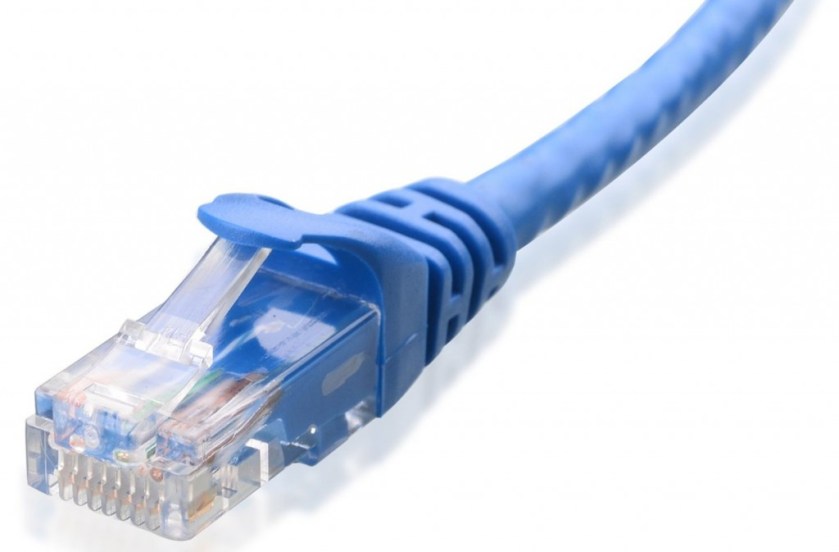
The RJ45 connector is a modular plug used primarily for network cabling. The connector feature eight pins to which the wire strands of a cable interface electrically. Standard RJ-45 pinouts define the arrangement of the individual wires needed when attaching connectors to a cable.

4545

RJ45 is a type of a variety of different connectors (for example: a type of RJ11 is also a connector, but it is used in the phone). The line using of RJ45 connector has two types: straight-through and cross-over.Have you ever had some confusion about RJ45 interface? That’s what we’ll explore today

Introduction of RJ45 Connector

RJ45 connector is the most common twisted-pair connector for Ethernet cables and networks. “RJ” means “registered jack”, which is a standardized telecommunication network interface for connecting voice and data equipment to a service provided by a local exchange carrier or long distance carrier. The physical connectors that registered jacks use are mainly the modular connector and 50-pin miniature ribbon connector types. RJ45 connector is an 8-position, 8-contact (8P8C) modular plug and jack, which is commonly used to connect computers onto Ethernet-based local area networks (LAN). RJ45 cable plug is usually made of a plastic piece with eight pins on the port. Four of the pins are used for sending and receiving data, and the other four are used for other technologies or power networking devices.

6645

Introduction of RJ45 Connector Color Code

As we all know, there are two wiring schemes: T568A and T568B, which are used to terminate the twisted-pair cable onto the connector interface. Two standards define how the RJ45 pinouts to arrange the individual eight wires when linking RJ45 connector to a cable. These wiring layouts have their own color convention, and following the convention is important to ensure electrical compatibility.

RJ45 Connector VS. RJ11 Connector

Several other types of connectors closely resemble RJ45, and the RJ11 connector used with telephone cables is one of such connectors. The close physical similarity of RJ45 and RJ11 makes it difficult for an untrained eye to tell the two apart. RJ11 connector is a 6P2C (6 position 2 contact) modular connector – only uses six positions rather than eight positions, which make them less popular than RJ45 connectors.

RJ45 and RJ11 are two commonly used jacks, each with their own specific purpose. The biggest difference between them is that they are used for different applications. RJ45 is used in networking, where you connect computers or other network elements to each other. RJ11 is the cable connector that is being used in telephone sets.

45

Aside from the application, another difference is the number of wires in their connectors. If you look closely at both connectors, you would see that there are only four wires inside an RJ11 while there are eight wires inside an RJ45. As a consequence, RJ45 connector is a little bit bigger than RJ11. It is then quite easy to deduce that you cannot plug in an RJ45 connector to a RJ11 slot but the opposite is possible. Although the smaller size of RJ11 makes it easier to be plugged into the RJ45 slot, it is not recommended to do so since this may damage the device that adopts the RJ45 slot. With proper knowledge and training, some people have been able to use RJ45s all over their house instead of RJ11s.

At present, RJ45 jacks are usually placed on the wall outlets inside people’s houses to reduce the number of visible wiring when using VoIP handsets that are rapidly gaining popularity.

RJ45 type network interface

10/100 Base TX RJ45 interface is commonly used in Ethernet interface, support for network connection speed of 10Base and 100Base of adaptive common RJ45 connector into two categories: for Ethernet cards, routers and Ethernet interface DTE type, for switches DCE type. DTE can be called data terminal equipment; the DCE can be called data communications equipment. In one sense, the DTE device is called the “active communications equipment DCE device called a” passive communications equipment. When the two types of devices use RJ45 interface communication, you must use a crossover cable. This can be defined from the following types of pin definitions of the RJ45 the DTE and RJ45 DCE type pin.

 RJ45 type cable plug

The RJ45 network cable connector also known as crystal head which a total of eight cores made of, widely used in LAN and ADSL broadband Internet connection to the user’s cable network equipment which named as CAT cables or twisted-pair. In the specific application, the RJ45-type plugs and cables, there are two connection methods, respectively called T568A line sequence and T568B linear order.

45454545

Application in products

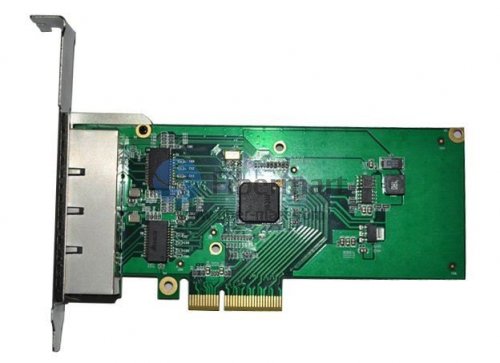
RJ45 ports are available on fiber optical products like media converters, pci-e cards, PDH multiplexers, protocol converters, Patch panels, and so on.

Conclusion

RJ45 connectors are the key part of Ethernet connectivity to transmit voice and data media. They were developed as much smaller and cheaper replacements to the older telephone installation methods of hardwired cords. The easy plug-n-play style reduces the difficulty of installation. Compared with RJ11, RJ45 is suitable for more applications, such as Ethernet networking, telecommunications, factory automation and so on. It is frequently used for networking devices including Ethernet cables, modems, computers, laptops, printers, etc.


What is Fiber Optic Adapter

by http://www.fiber-mart.com

Fiber optic adapters (also known as Fiber couplers, Fiber Adapter ) are designed to connect two optic cables together. They have a single fiber connector (simplex), dual fiber connector (duplex) or sometimes four fiber connector (quad) versions. The optical fiber adapter can be inserted into different types of optical connectors at both ends of the optical fiber adapter to realize the conversion between different interfaces such as FC, SC, ST, LC, MTRJ, MPO and E2000, and is widely used in optical fiber distribution frames (ODFs) Instruments, providing superior, stable and reliable performance.
Features of Fiber Optic Adapter
The optical fibers are connected by an adapter through its internal open bushing to ensure the maximum connection between the optical connectors. In order to be fixed in a variety of panels, the industry also designed a variety of finely fixed flange.
Transformable optical adapters are available with fiber optic connectors of different interface types on both ends and provide a connection between APC faceplates. Duplex or multi-adapter adapts to increase installation density and save space.
Fiber Optic Adapter types
FC Fiber Optic Adapter
This fiber optic adapter was first developed by Japan NTT. FC is an acronym for FERRULE CONNECTOR, indicating that its external reinforcement is the use of the metal sleeve, fastening the way for the buckle. The earliest, FC type connector, the docking end of the ceramic pin. Such connectors are simple in structure, easy to operate and easy to manufacture. However, the fiber end face is more sensitive to dust, and it is easy to produce Fresnel reflection and it is difficult to improve the return loss performance. Later, this type of connector has been improved, the use of docking the spherical end of the pin (PC), while the external structure has not changed, making the insertion loss and return loss performance has been greatly improved.
SC Fiber Optic Adapter
This is a kind of optical fiber connector developed by Japan NTT Corporation. The shell is rectangular, the pin and the coupling sleeve used in the structure of the same size and FC type. One end of the pin to use more PC or APC grinding method; fastening method is the use of plug pin type, without rotation. Such connectors are inexpensive, easy to plug and unplug, low insertion loss variations, high compressive strength, and high installation density.
DIN47256 Fiber Optic Adapter
This is a connector developed by Germany. The pins and coupling sleeves used in this connector are the same size as the FC type and the PC process is used for the end face processing. Compared with the FC type connector, the structure is more complex, and the internal metal structure has a control pressure spring to prevent the end face from being damaged due to the excessive insertion pressure. In addition, this connector has higher mechanical accuracy and therefore smaller insertion loss values.
MT-RJ Fiber Optic Adapter
MT-RJ started with the MT connector developed by NTT with the same latching mechanism as the RJ-45 type LAN electrical connector. Alignment of the optical fiber with guide pins mounted on both sides of the small bushing made it easy to communicate with the optical transceiver Machine connected to the connector end of the optical fiber for the dual core (0.75MM spacing) array design is mainly used for data transmission next generation high-density fiber optic connectors.
LC Fiber Optic Adapter
The lc-type connector is a well-known BELL (Bell) Institute of research and development, the use of convenient modular jack (RJ) latch mechanism made. The pins and sleeves used are half the sizes used for normal SC, FC, etc., at 1.25mm. This will increase the density of fiber optic connectors in fiber distribution frames. Currently, in the single-mode SFF, LC type of connector has actually occupied the dominant position, the application of multi-mode is also growing rapidly.
MU Fiber Optic Adapter
The MINIATURE UNIT COUPLING connector is the world’s smallest single-core fiber optic connector developed by NTT based on the currently used SC-type connector. The connector uses a 1.25MM diameter sleeve and self-holding mechanism, the advantage is that it can achieve high-density installation. NTT has developed the MU connector family with MU’s L.25MM diameter bushings. They have socket type connectors for optical cable connections; backplane connectors with the self-holding mechanism and simplified sockets for connecting LD / PD modules and plugs Wait. Demand for MU-type connectors will also grow rapidly as fiber-optic networks become more capable of larger bandwidths and DWDM technologies are widely used.
MTP/MPO Fiber Optic Adapters
Unlike the single-core SC fiber optic adapters, the SC fiber optic adapters are internally equipped with a ceramic ferrule that is precisely aligned through the ferrule when the SC connector ferrule is connected, while the MPO / MTP adapter is connected using an MPO / MTP Precise connection of two guide holes with a diameter of 0.7mm and a guide pin on the left and right ends of the ferrule. MPO / MTP adapters are widely used in communication system base stations, optical fiber distribution frames (ODFs) in building rooms, MPO / MTP cassette module, and various test instruments.

Three connection modes of the switch

There are three main ways to connect switches: cascading, stacking, and clustering. Cascade mode is simple to implement, just an ordinary twisted pair can be, cost savings and basically not limited by the distance. The investment in the stacking method is relatively large and can only be connected within a short distance, which is difficult to achieve. Cluster connection means that multiple interconnected (cascaded or stacked) switches are managed as a logical device.

There are three main ways to connect switches: cascading, stacking, and clustering. Cascade mode is simple to implement, just an ordinary twisted pair can be, cost savings and basically not limited by the distance. The investment in the stacking method is relatively large and can only be connected within a short distance, which is difficult to achieve. Cluster connection means that multiple interconnected (cascaded or stacked) switches are managed as a logical device.

tr
The stacking mode has better performance than the cascaded mode, and the signal is not easily depleted. Through the stacking mode, multiple switches can be managed in a centralized manner, which greatly reduces the management workload. If you really need to use cascading, you can also use the Uplink port. Connection method. Because this can guarantee the signal intensity to the greatest extent, if it is the connection between ordinary ports, it will certainly make the network signal seriously damaged.

1. Switch cascading
This is the most common way to connect multiple switches. It connects through the UpLink on the switch. It should be noted that the switches cannot be cascaded without limitation. Cascading over a certain number of switches will eventually cause broadcast storms, which will lead to a serious drop in network performance. Cascading is further divided into using ordinary port cascading and using Uplink port cascading.


2

1.1. Use ordinary port cascading

The so-called ordinary port is through a switch of a common port (such as RJ-45 port) to connect.
In the past, it was necessary to use the reverse connection. Now the two ends of the network cable are 568b line sequence. The jumper line is 568a line and 568b line sequence. According to the need, the old version of the device will distinguish the direct line from the crossover line. Now the devices are all common. What kind of consequences, the switch can automatically identify, and only the line can be wrong.


1.2 Use Uplink port cascading

In all switch ports, an Uplink port is included next to it. This port is provided exclusively for upstream connections. Simply connect the port to a port on the other switch except for the “Uplink port” through a straight-through twisted pair (note that it is not the Uplink port that is connected to each other).

33

2. Switch stack
This type of connection is mainly used in large networks where port requirements are relatively large. The stacking of switches is the quickest and most convenient way to expand ports. At the same time, the bandwidth after stacking is several-tenths of the speed of a single switch port. But not all switches support stacking, depending on whether the switch’s brand or model supports stacking. It is mainly connected through a dedicated connection cable provided by the manufacturer from the “UP” stack port of one switch to the “DOWN” stack port of another switch. All switches in a stack can be managed as a single switch.

Stacked switches are limited by the type and mutual distance. First, the stack switches must support stacking; in addition, the stacked connection cables provided by the manufacturers are generally around 1M, so the stacking function can only be used within a short distance.

34

3. Cluster
In the so-called cluster, multiple interconnected (cascaded or stacked) switches are managed as a logical device. In a cluster, there is generally only one switch that functions as a management switch,which is called a command switch. It can manage several other switches. In the network, these switches only need to occupy one IP address (only required by the command switch). Under unified management of the command switch, multiple switches in the cluster work together to greatly reduce management intensity.

It should be noted that different manufacturers have different implementations for clusters, and generally manufacturers use proprietary protocols to implement clusters. This determines the cluster technology has its limitations. Switches of different manufacturers can be cascaded but cannot be clustered.

444
Switching, stacking, and clustering are three different technologies. Cascading and stacking are prerequisites for implementing clusters. Clusters are used for cascading and stacking; cascading and stacking are implemented based on hardware; clusters are implemented based on software; cascading and stacking are sometimes similar (especially cascading and virtual Stacking), sometimes very different (cascade and real stacking).Please feel free to contact Fiber-Mart if you have any needs or questions.we will provide you with the most professional service.