
Telecom Hardware: NIC, Transceiver, Modem and Media Converter

People usually have the misconception about the devices like the network interface card, transceiver, modem and media converter in telecommunications fields. Some even don’t know how to use them correctly. In fact, these devices are all possessed with different functions. For example, a network interface card connects your computer to a local data network or the internet. A transceiver is responsible for taking the digital data represented by a series of zeros and ones. Modems takes the digital zeros and ones and converts it to an analog sound. While a media converter, as the name implies, is typically used to convert one media type to the other. To have a further understanding of their performances, you can have a look at the following article.
Network Interface Card
Just as said before, a network interface card (NIC) is used to connect your computer to a local data network. It functions as a middleman between your computer and the data network by translating the computer data into electrical signals. An Ethernet NIC is an indispensable transmission medium for Ethernet network. Note that we need to choose the right networking adapter that matches the transmission medium and network architecture we are connecting to. Today, most computers come with built-in Network Adapters, and the most popular one is Ethernet NIC.
Optical Transceiver
On an Ethernet network, a transceiver is mainly use to convert the digital signal to an electrical, radio or light signal by a method of encoding scheme. This method uses the number zero and one to represent the voltage. A 0 might be represented as a zero voltage on the wire, while a 1 might be represented by a positive voltage. Through this method, optical technician can easily know the performance of the transceiver. The old transceiver is just an adapter that took digital signals from an AUI port on one end and translated those into an electrical signal using RJ45 or some other port. Besides this transceiver type, there are several new types that will be introduced in the below part.
SFP Module
SFP short for Small Form Factor Pluggable, is typically used on switches and routers to easily modify the media type used by a port. SFP module is one of the common type of optical transceivers that is gaining used today, especially for Gigabit Ethernet application. Other than the former devices with a fixed media type, the port accepts the SFP module. As a result, to change the media type, we can simply plug in a different SFP module. For example, we can get an SFP to support copper or a different specifications of fiber optic. Figure 2 shows a SFP modules connected by a LC LC single mode fiber patch cable in a switch.
GBIC
GBIC (GigaBit Interface Converter) module is an old transceiver module, which is slightly larger than an SFP but performs the same function. A GBIC is a larger-sized transceiver that fits in a port slot and is used for gigabit media including copper and fiber optic. Besides the GBIC and SFP (or mini-GBIC), we should also mention an XFP transceiver, which is similar in size to an SFP but is used for 10 Gigabit networking. Additionally, there are QSFP+ modules for 40 Gigabit Ethernet and CFP or QSFP28 for 100G infrastructure.
Modem
Optical transceiver is mainly used to achieve the conversion between electrical signals and digital signals by the encoding scheme. A modem takes the digital zeros and ones and converts it to an analog sound signal that can be carried across the telephone wires. Modem is actually an abbreviated term that means modulator & demodulator. Modulation is happening on the sending end where binary data is converted to analog waves, and Demodulation is happening on the receiving end where the analog waves are converted back to binary data. Note that there is an encoding scheme that identifies when the signal represents a 0 or a 1, and the Network Adapter must match both the architecture and the transmission medium that is used.
Media Converter
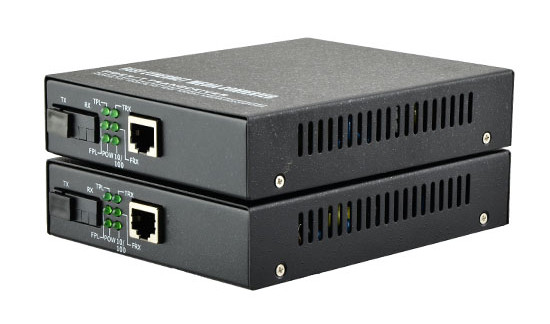
A media converter is usually used when you need to convert from one media type to another like from copper to fiber or vice versa. Supposing you had an Ethernet network that uses copper cabling but we had a server that had a fiber optic network adapter card. In this case we could use a fiber optic to Ethernet copper cable media converter. But one thing you should remember is that media converters work within the same network architecture. It means the media converter can convert from one type of Ethernet to another that uses a different transmission cable, but it is not used to convert from something such as Ethernet to a different networking standard.
In order to accomplish the process of converting from one architecture to another, it would require modifying the Frame contents to modify the Data Link layer address. Media converters operate at the Physical layer, since they simply transform the signal from one encoding scheme to another. However, media converters don’t read or modify the MAC address. The following image shows a SFP to RJ45 1000BASE Gigabit Fiber Media Converter.
Conclusion
At the end of the article, you might have a basic knowledge of the above devices. These devices are equipped with unique performances that play an important role in telecommunication fields. Equipment in telecom field must be correctly selected and mixed use of the is prohibited. Therefore, if you are not sure to how to use them, please seek advice from an expert. fiber-mart.COM is a rising and professional manufacturer. We not only offers a full selections of telecom products, but aim to provide the best services to the customers.
Media Converter vs Network Switch

Media converter and network switch are both widely used in today’s high speed network applications. In some scenes, one can used to replace another one. Then, which one should I choose for my network? What is the difference between media converter and network switch? This post will cover the knowledge of media converter and network switch, and explain the difference between them.
1.What is Media Converter?
Media converter is a very simple networking device that used to convert electrical signal utilized in copper cable to light signal for fiber optic cabling and vice versa. It is essential to have the fiber optic connectivity if the distance between two network devices is greater than the copper cabling’s transmission distance. They were introduced to the industry in the 1990s, and played an important part of fiber types of cabling system in connection with existing copper-based wiring system. They are also used in metropolitan area network (MAN) access and data transport services to enterprise customers.
2.What is Network Switch?
A network switch is a computer networking device that connects devices together on a computer network by using packet switching to receive, process, and forward data to the destination device. Usually, a switch serves as a controller, enabling networked devices to talk to each other efficiently. Through information sharing and resource allocation, switches save businesses money and increase employee productivity. And the network switch operates at the data link layer (Layer 2) of the Open Systems Interconnection (OSI) model called layer 2 switch, which operates at the network layer (layer 3) of the OSI model called layer 3 switch.
3.DifferencesBetween Media Converter and Network Switch
In fact, both a media converter and a network switch today can act and perform the same functions. And Both of them operate within the OSI model which is hierarchical and structured in the form of layers such as layer 1, layer 2, layer 3 and so on. A clear understanding of what OSI layers do, and what the differences between devices operating at different layers are, will help you learn about the difference between media converter and network switch.
 Layer 1: Media Converter
Layer 1 refers to the Physical Layer, which is the first layer of OSI model. It defines electrical and physical specifications for devices, and the relationship between a device and a transmission medium, such as a copper or optical cable. If a device only operates at Layer 1 of the OSI model, that is usually a media converter. Working at this layer, media converter is used to convert electrical signals and physical media, but don’t do anything for data changes. These media converters usually have only two ports to convert the incoming electrical signal from one cable type and then transmit it over another cable type, such as UTP to fiber and so on.
Layer 2: Media Converter and Network Switch
Layer 2 refers to the Data Link layer of the OSI model. The Data Link layer is concerned with moving data across the physical links in the network. Both media converter and network switch can operate at layer 2. The difference between a layer 2 media converter and a layer 2 network switch is the number of ports. Usually, a device with two or three ports is called a media converter. Compared with layer 1 media converter, a layer 2 media converter can be thought as an advanced converter. A device with four or more ports is called a network switch, and compared with layer 3 switch, a layer 2 switch is usually a basic switch.
Layer 3: Network Switch
Layer 3 refers to the Network layer of the OSI. The Network layer is concerned with knowing the address of the neighboring nodes in the network, selecting routes and quality of service, and recognizing and forwarding to the Transport layer incoming messages for local host domains. Only network switch can operate at Layer 3. Switches operating at Layer 3 are smarter than Layer 2 devices and incorporate routing functions to actively calculate the best way to send a packet to its destination.
Conclusion
Media converters can be used anywhere in the network to integrate newer technology with existing equipment to support new applications, technologies and future growth. Layer 2 and layer 3 network switches are also widely deployed in enterprise and data center for higher speed and more capacity. fiber-mart.com provides both media converters and managed network switches for your option. You can choose the most suitable one according to your specific needs.

Difference Between Media Converter and Network Switch

Media converter and network switch are both widely used in today’s high speed network applications. In some scenes, one can used to replace another one. Then, which one should I choose for my network? What is the difference between media converter and network switch? This post will cover the knowledge of media converter and network switch, and explain the difference between.

Media converter and network switch are both widely used in today’s high speed network applications. In some scenes, one can used to replace another one. Then, which one should I choose for my network? What is the difference between media converter and network switch? This post will cover the knowledge of media converter and network switch, and explain the difference between.

 What does Media Converter mean?

 A media converter, in the context of network hardware, is a cost-effective and flexible device intended to implement and optimize fiber links in every kind of network. Among media converters, the most often used type is a device that works as a transceiver, which converts the electrical signal utilized in copper unshielded twisted pair (UTP) network cabling to light waves used for fiber optic cabling. It is essential to have the fiber optic connectivity if the distance between two network devices is greater than the copper cabling’s transmission distance.The copper-to-fiber conversion carried out by a media converter allows two network devices having copper ports to be connected across long distances by means of fiber optic cabling.

Techopedia explains Media Converter

A media converter offers fiber-to-fiber conversion as well, from multi-mode fiber into single-mode fiber. It also converts a dual fiber link to single fiber with the help of bi-directional (BIDI) data flow. In addition, media converters have the capability to convert between wavelengths for applications that use wavelength division multiplexing (WDM).

Generally, media converters are protocol specific and they support an extensive array of data rates and network types. They are presented as physical layer or Layer 2 switching systems. Media converters that include Layer 2 switching functionality offer rate-switching as well as other innovative features.

Network intricacy, challenging applications and the increasing range of network devices drive network bandwidth and speed requirements to new extents and push longer distance requirements inside the local area network (LAN). The answer to these issues is media converters.Media converters permit fiber usage when required and integrate new devices into existing cabling infrastructure. Media converters provide flawless incorporation of fiber and copper, and various fiber forms in LAN networks. They support a multitude of protocols, media types and data rates to build a more trustworthy and cost-effective network.

Media converter characteristics:

·Expands network distances with the conversion of UTP to fiber and the extension of fiber links

·Retains investments in pre-existing devices

·Boosts the potential of present fiber with WDM wavelengths

New applications for media converters:

·Remotely handled converters and multi-port switch configurations

·Conversion of DM wavelengths to enhance the bandwidth capacity

·Facilitate fiber-to-the-desktop

What is Network Switch?

A network switch is a computer networking device that connects devices together on a computer network by using packet switching to receive, process, and forward data to the destination device. Usually, a switch serves as a controller, enabling networked devices to talk to each other efficiently. Through information sharing and resource allocation, switches save businesses money and increase employee productivity. And the network switch operates at the data link layer (Layer 2) of the Open Systems Interconnection (OSI) model called layer 2 switch, which operates at the network layer (layer 3) of the OSI model called layer 3 switch.

The relationship between switches, media converters, and OSI layers

Today’s media converters are often switches, and switches often act as media converters. Plus, both switches and media converters are frequently described in terms of layers—Layer 2, Layer 3. How can you tell what the heck you’re looking at?

Most of the confusion happens around OSI Layer 2 where Layer 1 media converters have evolved to meet basic switches. And today’s switches are rapidly advancing into Layer 3 and 4, territory formerly held by routers, muddying the waters still more.

A clear understanding of what OSI layers do, and what the differences between devices operating at different layers are, will help you select the right device.

OSI is a layered network design framework. The layers are referenced in the Open Systems Interconnection (OSI) Reference Model (which provides a layered network design framework that establishes a standard so that devices from different vendors work together). The OSI model is hierarchical. The layer at which a switch or a media converter operates determines which addressing detail it reads as data passes through.

Layer 1: media converters

Layer 1 is the Physical Layer. Media converters operating at Layer 1 only convert electrical signals and physical media without doing anything to data coming through the link.

These media converters only have two ports—one in, one out—and convert the incoming electrical signal from one cable type and then transmit it over another type—UTP to fiber, thick coax to Thin, and so on.

Layer 2: switches and media converters

Layer 2 is the Data-Link Layer. Devices operating at Layer 2 sort packets using physical network addresses, also known as MAC addresses. All network hardware is permanently assigned this number during its manufacture.

Both switches and media converters can be Layer 2 devices. Usually the only difference between a Layer 2 switch and a Layer 2 media converter is the number of ports—a device with two or three ports is called a media converter; four or more ports is called a switch. A media converter operating at Layer 2 may have more than two ports and may have ports operating at different speeds.

Devices operating at Layer 2 are very fast, but aren’t very smart because they don’t look at data packets closely. A Layer 2 media converter is considered to be fairly advanced for a media converter, but a Layer 2 switch is a basic switch. You follow?

Layer 3: switches

Layer 3 is the Network Layer. Layer 3 switches use network or IP addresses that identify locations on the network. Because they read packets more closely than Layer 2 switches do, they identify network locations as well as physical devices. A location can be a LAN workstation, an address in a computer’s memory, or even a different packet of data traveling through a network.

Switches operating at Layer 3 are smarter than Layer 2 devices and incorporate routing functions to actively calculate the best way to send a packet to its destination.

Layer 4: switches

Layer 4—the Transport Layer of the OSI model—coordinates communications between systems. Layer 4 switches are capable of identifying which application protocols (HTTP, SNTP, FTP, and so forth) are included with each packet, and use this information to hand off the packet to the appropriate higher-layer software.

Because Layer 4 devices enable you to establish priorities for network traffic based on application, you can assign a high priority to packets belonging to your vital in-house applications, with different forwarding rules for low-priority packets.

Layer 4 switches also provide an effective wire-speed security shield for a network because any company- or industry-specific protocols can be confined to only authorized switched ports or users. This security feature is often reinforced with traffic filtering and forwarding features.

High-end vs. low-end switches

Switches can also be considered low end or high end. A low-end switch operates in Layer 2 of the OSI model and can also operate in a combination of Layers 2 and 3. High-end switches operate in Layer 3, Layer 4, or a combination of the two.

Conclusion

Media converters can be used anywhere in the network to integrate newer technology with existing equipment to support new applications, technologies and future growth. Layer 2 and layer 3 network switches are also widely deployed in enterprise and data center for higher speed and more capacity. Fiber-Mart provides both media converters and managed network switches for your option. You can choose the most suitable one according to your specific needs:product@fiber-mart.com