
Application of MPO Cabling in High-Density Data Center

by http://www.fiber-mart.com

Fiber optic jumper applications in the data center are very extensive, and in recent years the data center fiber optic transmission system bandwidth demand shows a high growth trend, so the use of a new generation of fiber and optical modules can continue to explore the potential of fiber-optic network bandwidth growth. As the multimode fiber jumper in the cost of a great advantage, to promote its application in the data center.
With the continuous drive of the application and popularization of the network media in the cloud computing environment, the multimode fiber jumper is also developing, from OM1 to OM2, and from OM3 to OM4 to use the VCSEL laser optimization technology, the bandwidth demand is increasing. New OM4 Multi-mode jumper fiber standard EIA/TIA492AAAD is introduced, which provides a better transmission mode for multimode fiber in the future wide application. This article provides an ideal communication solution for your data center, servers, network switches, telecentres, and many other embedded applications that require high-speed data transmission.
In a transport port connection device in a 40G / 100G data transmission application, such as QSFP optical modules, regardless of Fiber Channel connections using several fiber connections, and regardless of the type of fiber connection, they are connected directly to the MTP / MPO connector. Because the 40G / 100G data transmission application channel and the device connection between the equipment need to form a special mode, so that the device’s transmitter and receiver channels corresponding to each other, which requires MTP / MPO connector to complete the connection.
The MPO/MTP fiber jumper can provide a wide range of applications for all networks and devices that require 100G modules. They use the high-density multimode fiber optic connector system MT series of casing design, MPO / MTP fiber jumper with UPC and APC polished end, and also supports multimode and single-mode applications. The 10G OM3 / OM4 MPO / MTP fiber jumpers provide 10 Gbps of data transfer rates in high-bandwidth applications, which are five times faster than the standard 50 μm fiber jumper.
At the same time, multi-mode MPO / MTP fiber jumpers are also the most economical choice for most of common optical fiber communication systems. Single-mode MPO / MTP fiber jumper is mainly used for long-distance data transmission system. The MPO / MTP trunk cable is designed for data center applications. Typically, single-mode and multi-mode MPO / MTP fiber jumpers are designed to be 3mm or 4.5mm round cable, and connectors at both ends of the cable are also referred to as MPO / MTP connectors.
The MPO / MTP high-density push-pull fiber jumpers are currently used in three areas: high-density cabling data centers, fiber-to-the-home, and connection applications with a splitter, 40G QSFP+ / 100G QSFP28, 10G SFP+ and other optical modules. Today, there are already a series of high-density parallel optical interconnect products that can accommodate optical fiber transmission in modern data centers, such as custom MPO / MTP fiber jumpers, multimode fiber loopers, and QSFP+ high-speed cable assemblies.
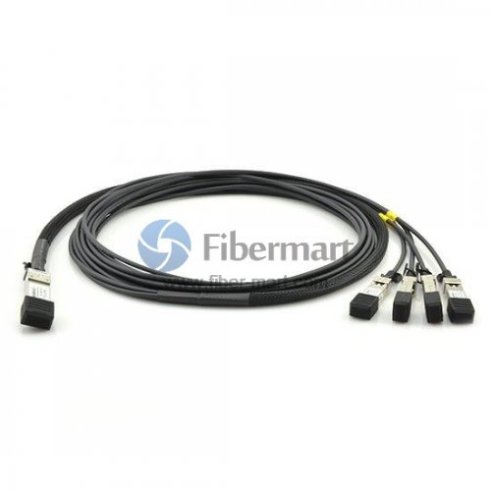
Server virtualization and the development of cloud computing, as well as the development trend of network convergence, bringing a faster and more efficient data center network development needs. At present, 48x 10G channel composed of 10G switches, mainly limited to the use of SFP+ module to achieve the connection. In order to meet the higher bandwidth requirements, users can use a high-density QSFP+ high-speed cable to complete the connection, by increasing the data transmission rate of each channel and increase the port density to meet customer’s high bandwidth requirements.

Guide to SFP+ Transceiver For 10 Gigabit Ethernet

by http://www.fiber-mart.com

Introduction to SFP+ transceiver
The small form-factor pluggable plus (SFP+) transceiver is based on SFP and developed by the ANSI T11 fibre channel group. SFP+ has become the most popular socket on 10GE systems due to its smaller size and lower power. SFP+ modules can further be grouped into two types of host interfaces: linear or limiting. Limiting modules are preferred except when using old fiber infrastructure which requires the use of the linear interface provided by 10GBASE-LRM modules.
10 Gigabit Ethernet Standards
10 Gigabit Ethernet is a group of computer networking technologies for transmitting Ethernet frames at a rate of 10 gigabits per second. It was first defined by the IEEE 802.3ae-2002 standard. Like previous versions of Ethernet, 10GbE can use either copper or fiber cabling. However, because of its bandwidth requirements, higher-grade copper cables are required: category 6a or Class F/Category 7 cables for links up to 100m. The 10 Gigabit Ethernet standard encompasses a number of different physical layer (PHY) standards. A table is listed below to offer you a visual impression of the standards of 10 Gigabit Ethernet.
10 Gigabit Ethernet Standards
Types of SFP+ transceiver for 10 Gigabit Ethernet
SFP+ transceiver complaint with the 10 Gigabit Ethernet standards can be classified into 10GBASE-T SFP+, 10GBASE-SR SFP+, 10GBASE-LR SFP+, 10GBASE-ER SFP+, 10gBASE-LRM SFP+, etc. Next I will provide a brief introduction of the most common SFP+ transceivers for 10 Gigabit Ethernet—10GBASE-SR SFP+, 10GBASE-LR SFP+, 10GBASE-ER SFP+.
10GBASE-SR SFP+
The 10GBASE-SR SFP+ is a port type of multi-mode fiber and uses 850nm lasers. Over OM1, it has a range of 33 m, over OM2 a range of 82 m, over OM3 300 m and over OM4 400 m. 10GBASE-SR delivers the lowest cost, lowest power and smallest form factor optical modules, which was projected to make up a quarter of the total 10GbE adapter ports shipped in 2011. Take 10GB-SR-SFPP ( see in the below image) as an example, it is fully compatible with Extreme devices and the SFP+ 20-pin connector to allow hot plug capability.
10GBASE-LR SFP+
10GBASE-LR SFP+ is designed for single-mode fiber and operates at a nominal wavelength of 850 nm. The 10GBASE-LR transmitter is implemented with a Fabry–Pérot or Distributed feedback laser (DFB). DFB lasers are more expensive than VCSELs but their high power and longer wavelength allow efficient coupling into the small core of single-mode fiber over greater distances. Compared with 10GBASE-SR, the maximum range of 10GBASE-LR is 10 km.
10GBASE-ER SFP+
10GBASE-ER SFP+ transmits over single-mode fiber. Its operating wavelength is 1550 nm. This kind of SFP+ module is used to connect devices both in the same cabinet and in different physical locations up to 40km in distance that is widely used in large building, co-location facilities and carrier neutral internet exchanges.
Conclusion
SFP+ transceiver is widely used to support communication standards including synchronous optical networking (SONET)/synchronous digital hierarchy (SDH), gigabit ethernet and fiber channel. From this text, we have acquired some information about SFP+ transceiver for 10 Gigabit Ethernet. Fiberstore manufactures a complete range of SFP+ transceivers such as 10GB-SR-SFPP, SFP-10G-ER, JG234A, etc. For more information, please feel free to contact us at www.fiber-mart.com.

Overview of SFP+ Direct Attach Copper Cable

by http://www.fiber-mart.com

SFP+ direct attach copper cable assembly is a high speed and cost-effective alternative to fiber optic cables in 10G Ethernet applications. 10g copper SFP is suitable for short distances, and ideal for highly cost-effective networking connectivity within a rack and between adjacent racks. It enables hardware OEMs and data center operators to achieve high port density and configurability at a low cost and reduced power requirement. SFP+ direct attach copper cable has been a good solution. This post will provide you with some basic information about SFP+ direct attach copper cable.
Introduction
SFP+ direct attach copper cable, also known as twinax cable, is an SFP+ cable assembly used in rack connections between servers and switches. It consists of a high speed copper cable and two SFP+ copper modules. SFP+ copper modules allow hardware manufactures to achieve high port density, configurability and utilization at a very low cost and reduced power budget. SFP+ copper cable assemblies meet the industry MSA for signal integrity performance. The cables are hot-removable and hot-insertable, which means that you can remove and replace them without powering off the switch or disrupting switch functions. A cable comprises a low-voltage cable assembly that connects directly into two SFP+ ports, one at each end of the cable. The cables use high-performance integrated duplex serial data links for bidirectional communication and are designed for data rates of up to 10 Gbps. The following picture shows a Cisco SFP-H10GB-ACU7M compatible 10G SFP+ direct attach copper twinax cable.
Cisco SFP-H10GB-ACU7M Compatible SFP+ Direct Attach Copper Twinax Cable
Types of SFP+ Direct Attach Copper Cables
Generally, SFP+ direct attach copper cable assemblies have two types, SFP+ active direct attach copper cable and SFP+ passive direct attach copper cable.
SFP+ Active Copper Cable: SFP+ active direct attach copper cable assemblies contain low power circuitry in the connector to boost the signal and are driven from the port without additional power requirements. The active version provides a low cost alternative to optical transceivers, and are generally used for end of row or middle of row data center architectures for interconnect distances of up to 15 meters.
SFP+ Passive Copper Cable: SFP+ passive direct attach copper cable assemblies offer high-speed connectivity between active equipment with SFP+ ports. The passive assemblies are compatible with hubs, switches, routers, servers, and network interface cards (NICs) from leading electronics manufacturers like Cisco, Juniper, etc.
Applications of SFP+ Direct Attach Copper Cables
Serial data transmission
Network Interface Cards (NICs)
Data center cabling infrastructure
Fibre Channel over Ethernet: 1, 2, 4 and 8G
10Gb Ethernet and Gigabit Ethernet (IEEE802.3ae)
High density connections between networking equipment
High capacity I/O in storage area networks, and storage servers
InfiniBand standard SDR (2.5Gbps), DDR (5Gbps) and QDR (10Gbps)
Switched fabric I/O such as ultra high bandwidth switches and routers
FAQs of SFP+ Direct Attach Copper Cables
1. Whether active or passive cable assemblies are required?
Active cable assemblies have signal amplification and equalization built into the assembly. They are typically used in host systems that do not employ EDC. Passive cables have no signal amplification in the assembly and rely on host system Electronic Dispersion Compensation (EDC) for signal amplification/equalization.
2. What are the performance requirements for the cable assembly?
Both SFP+ active and passive copper cable assemblies should meet the signal integrity requirements defined by the industry MSA SFF-8431.
3. What cable length and wire gauge are required?
Cable length and wire gauge are related to the performance characteristics of the cable assembly. Longer cable lengths require heavier wire gauge, while shorter cable lengths can utilize a smaller gauge cable. Smaller wire gauges results in reduced weight, improved airflow and a more flexible cable for ease of routing.
4. Are there any special customer requirements?
Examples of special customer requirements include: custom cable lengths, EEPROM programming, labeling and packaging, pull tab length and color, company logo, signal output de-emphasis, and signal output amplitude. You can order custom cables to your specific system architecture.
Conclusion
fiber-mart.com SFP+ twinax copper cables are available with custom version and brand compatible versions. All of them are 100% compatible with major brands like Cisco, HP, Juniper, Enterasys, Extreme, H3C and so on. Both passive twinax cables in lengths of 1, 3 and 5 meters, and active twinax cables in lengths of 7 and 10 meters are available. And the lengths can be customized up to the your requirements. You can get high quality compatible SFP+ cables and worldwide delivery from fiber-mart.com.

Direct Attach Cable(DAC) VS Active Optical Cables(AOC)

As one kind of optical transceiver assembly, Active Optical Cables (AOC) and Direct Attach Cables (DAC) are a alteration of optical transceiver, they are used to connect switches with one another when creating a stack or switches to routers or servers.

As one kind of optical transceiver assembly, Active Optical Cables (AOC) and Direct Attach Cables (DAC) are a alteration of optical transceiver, they are used to connect switches with one another when creating a stack or switches to routers or servers.

A Direct Attach Cable (DAC) can be produced as passive or active. As the passive DAC has no active components, it offers a direct electrical connection between corresponding cable ends. This method can also be completed by an active DAC, which is considered active because there are extra electronics embedded inside the connectors. Therefore it helps to advance signal quality, offering a longer cable distance. The DAC is a fixed assembly that can be bought in several lengths for short distances of up to 15 Meter.They are suitable for short distances, making them ideal for highly cost-effective networking connectivity within a rack and between adjacent racks.

AOC cable is always active. It has two types of connectors combined with fixed optical fibers with a similar function as optical transceivers. In respond to the demand for a higher data bandwidth, active optical cable (AOC cable) has came into being to satisfy different cloud computing applications. Active optical cable is a term used to describe a cable that mates with standard electrical interfaces. The electrical-to-optical conversion on the cable ends is adopted to enhance the transmission speed and distance of the cable without sacrificing compatibility of standard electrical interfaces.

Both DAC and AOC have their particular advantage and disadvantage.

Growth of fiber technology, someone may believe that copper technology is obsolete. This is not accurate for direct attach copper cables. Indeed, a direct attach copper cable still has its advantages:

With the growth of copper cable technology, in Today’s market,DAC can support higher data rates than old copper interfaces—from 4Gbps to 100Gbps per channel.  reduce the overall power consumption and heat dissipation, which help network operators save cost.DAC cables are similar and hot swappable just like fiber optic modules. Supporting such multiple protocols from Gigabit to 100G Ethernet,Direct Attach Cables (DAC) are a cost effective solution compared to optical transceivers.

DAC cables have the potential to Another factor is that DAC cable is robust and does not need patch panels or additional cables when connected to devices, as is the case with an optical module. The modules on both ends make them sturdy and reliable as well as space-saving.

dac

Though there are a few disadvantages of using direct attach cables: One of it is that direct attach (DAC) copper cables are more thick and massive than AOC cables, making it difficult to be managed. Additionally, since the electrical signals are used, direct attach copper cables are susceptible to the effects of electromagnetic interference (EMI), such as unwanted responses, degradation, or complete system failure.

AOC provides more advantages, such as lighter weight, high performance, low power consumption, low interconnection loss, EMI immunity and flexibility.

AOC

AOCs are a substitute to optical transceivers which exclude the detachable interface between transceiver modules and optical cables. It offers a number of advantages over direct attach copper (DAC) cables. due to its material, AOC weighs less than a DAC cable. optical fiber uses light signals, AOC is immune to electromagnetic interference. the disadvantage of AOC is that it may be a slight more expensive for customers.

Whatever believe it or not, Nothing can be perfect, so do the DAC cables. Although they can save space and cost for data center managers, the drawbacks still exist. As the main element of DAC cable is copper, it is heavy and bulky. the more important, if DAC cables are deployed in high volume, the cable diameter and cable stiffness are another problem that should be considered. In this case, active optical cables (AOC cables) seem to be a better choice, for they are made of thinner and more pliable optical cable.

Fiber-Mart supplies various kinds of high speed interconnect DAC & AOC cable assemblies including 10G SFP+ Cables, 40G QSFP+ Cables, and 120G CXP AOC Cables. All of our cables can meet the ever growing need to cost-effectively deliver more bandwidth, and can be customized to meet different requirements. For more information,pls visit www.fibermart.com. if you have any requirements , pls not hesitate to contact with us service@fiber-mart.com


11 Common Networking Cable Mistakes

by http://www.fiber-mart.com

Network cabling is one of those things that seems easy on paper but ends up being hard once you apply it in the real world. Most people tend to ignore it but do not realize how much it will cost them in the long run. You could find yourself paying extra costs that were unnecessary in the first place, wasting time on running maintenance tests that never needed to be performed if the job was done right, poor network performance, and much more.
Close up of network cables connected to switch
The most surprising thing about networking cable mistakes is that there aren’t thousands of little mistakes that are being made. Many IT professionals agree only a few fundamental mistakes are responsible for the majority of the problems.
Here is a short list of the 11 most common networking cable mistakes that are seen in the IT industry:
1) No cable management. This is where it all starts. Forget testing and other things – you can’t expect solid network performance if you are not properly managing your cables. This means that you will have to do the necessary work of properly labeling your cables and organizing them in a way that they can be easily accessed. Whether you use a rack or some other means, it is important to get this crucial mistake out of the way. It will be far easier to manage the cables, and maintenance will take up less of your valuable time.
2) Failing to plan. Before you even begin to take your cables and start connecting them to every port in sight, you need to know how everything is going to be laid out. Planning out your cable organization in advance is the first step to properly setting up your network.
Network cable bundle
3) Ignoring the rules. The best cable setup in the world is meaningless if you are breaking the rules! There are certain laws, standards, and codes that you have to abide by at the local, state, and federal level. Read up on the standards that pertain to you and your company. It’s one thing to have a safety hazard because you ignored the rules and another thing to pay hefty fines!
4) Failing to control atmospheric temperature. The environment in which you set up your cables makes a huge difference. If the cables heat up too much, it could lead to the failure of the entire network. Likewise, moisture can also lead to network failure and compromise the safety of nearby workers. You need a system in place to keep all of your cables cool and dry. Cooling systems, air conditioning – whatever it takes to get the job done: Do it.
5) Ignoring distance limits. In general, 100 meters is the limit for the length of a cable. Keep in mind that this distance also includes path leads. Each cabling has its own limits, however, so you need to mindful of the cabling that is being used for your network.
6) Running cables near interference-causing devices. Believe it or not, there are many ways for interference to mess up your cabling setup. There are several types of interference (magnetic, electrical, etc.) that can be caused by seemingly harmless things like motors and fluorescent lighting. The pathway you set up for your cables should be free of these types of hazards.
7) No space for cable removal. The IT environment is dynamic in nature, and changes are going to be happening all the time. Adapting rapidly to change means that you should be able to easily remove cables at any time. If not, you are paving the way for operational hazards. When in doubt, always leave a little more space than you think is necessary.
8) Using separate cabling for data and voice. The traditional way of designing a cable network was to use separate set-ups for data and voice. Due to the different needs of the end user, this is no longer a viable option. Your best bet is to use twisted pair cabling.
9) Running cable parallel to electrical cables. This is a common mistake that usually leads to interference in data transmission from one point to the other. This can be remedied by crossing them in perpendicular instead of parallel.
10) Failing to test your network before activating it. Once everything has been set up, and you are happy with your layout, don’t forget to test your network before activating it. This will help you catch any errors you may have missed and address problems regarding data transmission and safety. Make sure to use the appropriate tools.
A bunch of network cables in a data center
11) Failing to ask for help. Sometimes, when all else fails, and you don’t know what to do, you need a second pair of eyes to look at what you have done. Call a licensed, experienced professional to help you set up your networking cable in a way that is safe and helps to transmit data efficiently.
Those are the 11 most common mistakes that you are going to see with networking cable. As long as you are aware of them and pay extra attention during the setup, you should be good to go on the first try! If not, look back at each mistake individually and check to make sure that you did not miss anything.

Uses for Ethernet Cable

by http://www.fiber-mart.com

Ethernet cables are standard wires that connect computers to a network. These cables are specifically designed to facilitate easy communication between disparate electronic equipment. These electronic devices can either be fax machines, printers, scanners, or personal computers.
An Ethernet cable facilitates communication between the internet servers and your personal computer. The cable provides stable internet connection. This means that you can work all day and download and upload your files without stress. Here are a few things you need to know about Ethernet cables:
How to connect Ethernet cables
An Ethernet cord can connect two devices using the Ethernet ports on each. The cable is locked into place by a modular plug. Connecting your device using these cables requires patience because modular plugs tend to break easily. The first thing that you need to do is to hold the cable firmly and then turn it so that the small plastic plug faces up. Insert the cord into your computer’s Ethernet port. A computer has several ports, but an Ethernet port is usually bigger than the other ports. Firmly push the cable into the port until the plug locks into the place. You need to be careful when pushing the cable to the port to make sure that you don’t break the modular plug.
After inserting your plug, you need to check whether the internet is working. If it is not working, you should check whether the cable was inserted well in your computer and in the internet port. This connection process will only take you less than 5 minutes and you are good to go. You can use the Internet to download and transfer large files without any interruptions.
Benefits
Installation simplicity
These cables are easy to install because they come in different sizes. So, you can choose the size that fits your needs. For example, if you buy a hub or a router from one of your local computer shops, you can easily insert the cables into each port on the hardware devices. Computers come pre-built with Ethernet network adapters. This means that you can easily insert cables into the computer even if you don’t have knowledge in network administration.
Speed
Contrary to what most people believe, an Ethernet network is fast. This means that you can use cables to connect several computers in your home and enjoy surfing at a reasonable speed. This cable network connection is fast enough to transfer large files within a short time. This speed is also reliable because cables are not subject to breakdowns such as the case with modems and other wireless devices.
Availability
Ethernet cables are readily available. The cables are also cheaper compared to other types of cables such as coax and fiber. You can easily find a replacement in our selection if you accidentally break your cable. FireFold is here to help if you have any questions!