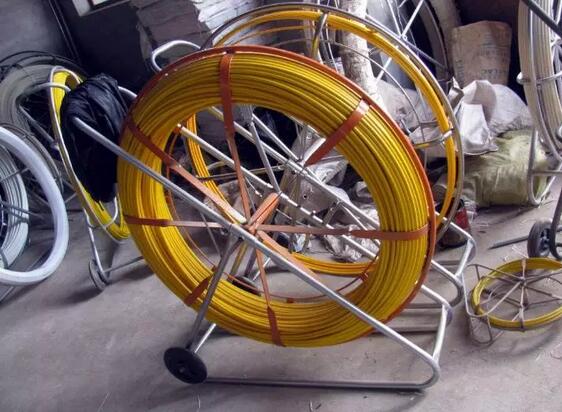
Five things you should know before your next installation

by http://www.fiber-mart.com

There are five things you should know before your next installation in order to avoid potential network failure and reduce your risk of costly mistakes.
1 Know your contractor
2 Increase error-free work with trained technicians
3 Ensure a quality installation with quality fiber optic products
4 Require a 25-year warranty for additional network protection and coverage
5 Request system testing results to ensure cabling system is properly functioning
Know your contractor
fiber optic installation is only as good as the products and the contractor you select. By choosing a reputable manufacturer such as Corning Cable Systems, half the battle is eliminated. However, choosing an installer for your thnext project can be time consuming and even frustrating at times. Utilizing the Network of Preferred Installers gives you reassurance that your installer is a handpicked, first-rate choice. Our by-invitation-only network means less financial risk of expensive mistakes and a higher probability of your complete satisfaction.
Increase error-free work with trained technicians
The bulk of improper installations are due to untrained or uncertified technicians. By making certain your contractor’s company has received proper hands-on training, you reduce the possibility of onsite cabling errors. All Preferred Installers within our network have received training on Local Area Network (LAN) design and hands-on product training. Because all training requirements must be renewed every two years, this means your installer is up-to-date on current installation methods, testing procedures, and product knowledge.
Ensure a quality installation with quality fiber optic products
The amount of information carried in two strands of optical fiber would require a copper cable four inches in diameter. When considering the space constraints, required bandwidth, and long distance transmission needs in today’s applications, fiber optic products are the only viable choice. Easy installation and upgrades allow you to meet future growth needs and install spare fiber today for a more economical choice than installing additional cables later. Corning Cable Systems LANscape® Solutions gives you quality products for all your fiber optic needs to reduce your risk of network failure.
Require a 25-year warranty for additional network protection and coverage
An extended warranty helps protect you from unexpected repair bills and provides the peace of mind that comes along with the Corning Cable Systems 25-year guarantee on its LANscape Solutions. Our warranty is simple. If a component fails, we replace it – no questions asked. By taking advantage of this additional coverage, your network is ensured to continue operating at its highest performance.
Request system testing results to ensure cabling system is properly functioning
Fiber optic testing of newly installed systems not only verifies that the system meets its design requirements, but also creates a performance baseline for all future testing and troubleshooting of that system to support the evaluation of warranty claims, should they ever arise. Corning Cable Systems requires that all fiber optic systems installed by members of the Network of Preferred Installers be tested to a minimum set of standards. This testing will ensure that the data necessary to properly evaluate any future system malfunctions will be available. The result will be better and faster service to you. Furthermore, by requiring a copy of your system’s bill-of-materials and design documents, we are able to quickly process potential claims to get your network back up and running once more.

MPO/MTP Trunk Cable Advantages

by http://www.fiber-mart.com

A specific lengths pre-assembled MTP/MPO Trunk cable with 12 or 24 fibers is delivered to data center for easy installation, because an It is impossible to manually to assemble MPO/MTP plug connector with 12 or 24 fibers on site during installation.
The advantages of MPO/MTP Trunk cable with the following advantages
• Higher Quality
Higher quality is usually achieved through factory assembly and inspection of individual parts. A factory-prepared inspection certificate is also useful for longterm documentation and in turn quality assurance purposes.
• Minimum Skew
A crucial factor in achieving a successful parallel optical connection is keeping the signal offset (skew) between the four or ten parallel fibers to an absolute minimum. Only in this way can information be successfully re-synchronized and re-combined at its destination. Factory-assembled trunk cables allow skew to be measured, minimized and logged.
• Shorter Installation Times
Pre-assembled MPO cable systems provide plug-and-play advantages and can be inserted and set up immediately.
This reduces installation time enormously
• Better Protection
Because they are completely assembled at the factory, cables and plug connectors remain completely protected from
environmental influences. Optical fibers that lie open in splice trays are at a minimum exposed to ambient air and may age faster as a result.
• Smaller Cable Volumes
Smaller diameters can be realized in MPO cabling systems that are produced from loose tube cables. The results are
correspondingly smaller cable volumes, better conditions for acclimatization in the data center and a lower fire load.
• Lower Overall Costs
When splice solutions are used, a few factors that are not always foreseeable boost total costs: time-intensive,
equipment-intensive splicing, needs for specialty works, bulk cables, pigtails, splice trays, splicing protection, holders. In contrast, pre-assembled trunk cables not only bring technical advantages, but usually result in lower total costs than splicing solutions.

Solid vs Stranded Cable – Which one should i Choose?

by http://www.fiber-mart.com

If you are on the fence as to whether you should use solid vs stranded cable, you are not alone. People all around the world struggle with this decision and there are no clear cut answers. The best option for you hinges on the nuances of your particular situation. Let’s take a look at the differences between the two types of cables and examine instances where one will function better than the other.
Solid vs Stranded Cable: The Basics
Solid cable is built with one strand or the core of a wire that has non-conductive material for insulation. This type of cable is used for home electrical wiring, wiring for breadboards and other situations where wires are not required to be constantly flexed. Stranded cable is made up of a collection of small gauge wires that are insulated and compressed with materials that are non-conductive. This type of cabling is typically used in situations where wire must be routed into cramped spaces. It is also used in areas where there is considerable flexing or vibrations. Examples include speaker wire, headphone cables and appliance cables.
Situations Where Stranded Cables are Ideal
Those who require cabling for intricate purposes such as circuit boards or electronic devices will favor stranded wires as they’ll remain intact and protected even if twisted or bent when connecting electrical components.
Situations Where Solid Cables are Ideal
Those who work outdoors or use heavy duty applications might expose the cables to corrosive particles, erratic movements and harsh weather conditions. Solid cables are best for these types of situations.
The Benefits of Solid Cables
Solid cables are often favored because they usually more affordable than the stranded variety due to their cheaper production costs. These cables are simple yet quite durable. As single, thick strands of cable, they are quite resistant to threats and very easy to produce. Solid cables also have a much more compact diameter compared to stranded cables. Yet this reduced size does not reduce the current carrying ability of solid cables. Add in the fact that solid cables are not as prone to failure as a result of corrosion and it is easy to see why they are held in high regard.
The Disadvantages of Solid Cables
Though solid cables have plenty of laudable characteristics, they also have a few flaws. One of the main problems with solid cables is that they are usually only sold in small gauges. Also, if there is constant flexing or vibrations, the cable could eventually wear down and break, creating the need for a replacement. Therefore, solid cables are not optimal for applications like robotics or vehicles that require a considerable amount of movement. If the cable must be bent into awkward shapes, the solid cable won’t have the appropriate amount of malleability and fortitude to remain fully intact.
Benefits of Stranded Cables
Stranded cables are easier to route in comparison to solid cables. They are also extremely flexible. Stranded cables can withstand an incredible amount of vibrations and flexing without fatiguing and eventually breaking. As a result, you won’t have to replace your stranded cables as often as will be necessary with solid cables.
Disadvantages of Stranded Cables
Stranded cables are far from perfect. Their diameter is quite large yet they provide a similar carrying capacity as solid cables. They are also more expensive as their production costs are considerably higher than solid cables. These costs are higher due to the complex manufacturing process that is required to develop these intricate wires. Also, stranded cables are much more likely to falter as a result of corrosion from capillary action. It is also worth noting that stranded cables are not ideal for preventing electronic interference as the air channels in between each strand amplify the “skin effect” created by the magnetic fields along the cable’s surface.
Be sure to take each of the factors listed above into account before making a commitment to either solid vs stranded cable for your home or business project.

About Hidden Cable Cabling, You Must Know the Hidden Rules

This article said something about Hidden Cable Cabling, You Must Know the Hidden Rules.

1. People participating in the construction should follow the following:
1.Wear suitable clothes
2.Guarantee the safety of the work area
3. Use safe, qualified tools
4.Formulate construction safety measures in advance

www.fiber-mart.com1

2. Cable laying requirements:
1.Before the fiber patch cable is laid, check whether the specifications, routes, and locations conform to the design rules.
2. The laying of the cable should be straight, do not produce a circle and so on, do not have damage.
3.Before laying out the cable, there must be marks on both ends of the cable, indicating the start and end positions. The label should be used as far as possible.
4.Signal cables, power cables, twisted-pair cables, and other weak cables should be placed as far apart as possible.
The cabling should be redundant. In the secondary exchange room and between the equipment twisted pairs, 3-6 meters must be reserved and the working area should be 0.3-0.6 meters.
5.When laying cables, the distance between the fulcrums of the cables hanging during the traction should not exceed 1.5 meters.

www.fiber-mart.com2

 3. Take the line:

Pull the cable from the cable box

a: Remove the plastic plug

b: Pull a few meters of cable through the outlet hole.

c: Pull out the required length of cable, cut it, slide the cable back into the slot, leaving 5 cm outside.

www.fiber-mart.com3

4. cable processing:

a.Use a diagonal pliers to open the “1” pattern outside the plastic.
b.Hold the fiber patch cable firmly in one hand. Use a long nose pliers to hold one end of the nylon pull string and pull it away from the end of the cable. The length is determined as required.
c.Cut off the useless leather jacket.

www.fiber-mart.com4

5. cable traction:

When pulling multiple pairs of twisted pairs, bundle multiple cables into one bundle and let them terminate.
2.Use an electrician to glue tightly around the cable and wind 5-6 meters outside the end.
3.Pull the rope through the electrical cable with a good cable and knot it.
Note: If you loosen the connection point while pulling the cable, you must retract the cable, and then make a firm connection.

www.fiber-mart.com5

Horizontal wiring considerations:
1) Pipeline routing
Pipeline routing is when the concrete has been buried in the pipeline, the pipeline  traction  cable wire or wire, construction time to understand the pipeline map, make a construction plan.
If there is no embedded pipe, it should be done synchronously with the decoration, so that it is easy to wire and look beautiful and prevent rework.

www.fiber-mart.com6

2)In ceiling wiring:

a.Obtain a construction plan and determine the route.
B. Along the design route, open the ceiling and slowly push the panels apart with both hands.
Put multiple cable boxes side by side with the line up.
d. From the end furthest from the wiring closet, draw the end of the cable along the cable tray over the ceiling of the ceiling corridor.
e.Move the ladder to the next hole in the suspended ceiling until the rope reaches the end of the corridor.

Fiber-Mart offers a wide variety of fiber optic cables, jumpers, Any questions or needs welcome to communicate with us: product@fiber-mart.com.

Five Tips for Choosing QSFP28 Fiber Optic Transceivers

by http://www.fiber-mart.com

The QSFP28 standard is designed to carry 100 Gigabit Ethernet, EDR InfiniBand. or 32G Fibre Channel. This transceiver type is also used with direct-attach breakout cables to adapt a single 100GbE port to four independent 25 gigabit ethernet ports (QSFP28-to-4x-SFP28). Sometimes this transceiver type is also referred to as “QSFP100” or “100G QSFP” for sake of simplicity. Please refer to the following tips for choose the right 100G Optical Modules for your modern data center.
Optical Modules Selection Based on Distance
<100 meter, When the transmission distance is within 100m, The QSFP28 SR4 optical module is highly recommended. The QSFP28 SR4 supports links up to 70m via OM3 Multimode fiber and 100m via OM4 Multimode fiber, with MPO / MTP fiber interface. It offers 4 independent transmitting and receiving channels, and each is with 25Gbps able to be aggregated into 100Gbps. Meanwhile, the QSFP28 SR4 optic module is also ideal for the connections from rack to rack in the data center.
100m to 10km, When the transmission distance is over 100m but shorter than 10 km, the QSFP28 LR4 optical transceiver is preferred. The QSFP28 LR4 is a fully integrated 4 × 25Gbit/s optical transceiver module, supporting distance up to 10 km. So for long span 100G deployment, such as cabling between two buildings, QSFP28 LR4 with duplex LC and single-mode fiber cable is the perfect option.
>10km, When transmission distance exceeds 10 km, the QSFP28 ER4 module is ideal for very long transmission distance. It provides superior performance for 100G Ethernet applications up to 30km links and converts 4 input channels of 25Gb/s electrical data to 4 channels of LAN WDM optical signals and then multiplexes them into a single channel for 100Gb/s optical transmission.
Optical Modules Selection Based on Applications
QSFP28 CWDM4 provides a 100G Ethernet high-speed link with a maximum transmission distance of 2 km, which interfaces with LC duplex connectors, and uses Mux/Demux technologies with 4 lanes of 25Gbps optically multiplexed into and demultiplexed from duplex single-mode fiber.
QSFP28 PSM4 doesnot need any MUX/DEMUX technology for each laser but it does need either a directly modulated DFB laser (DML) or an external modulator for each fiber. Besides, with an MPO/MTP interface, PSM4 modules can transmit data at 100Gb/s from point to point over 2 km or can be divided into dual 50Gb/s or quad 25Gb/s links for linking to servers, storage and other subsystems.
It’s seen from that both of QSFP28 CWDM4 and QSFP28 PSM4 are designed to meet the requirement for intermediate or mid-reaches for datacenter applications (500 m to 2 km). And they both use WDM and parallel single mode fiber technologies and support transmission distance up to 2 km.
When faced with such a situation, maybe we can make a decision from the two aspects. For one thing, from the aspect of an inner transceiver module structure, by comparison , PSM4 can be more cost-effective due to its lower component costs. For another thing, from the infrastructure viewpoint, PSM4 will be more expensive when the link distance is long, because PSM4 uses 8 optical single-mode fibers while CWDM uses only 2 optical single-mode fibers.

QSFP28 Transceiver Modules Installation Guide

by http://www.fiber-mart.com

CAUTION:
When installing or removing a transceiver module, avoid touching the golden plating on the transceiver module with a bare hand.
Do not remove the dust plug from a transceiver module if you are not to connect an optical fiber to it.
Remove the optical fibers, if any, from the transceiver module before installing it.
To avoid ESD damage, wear an ESD wrist strap when installing or removing an QSFP28 transceiver module or network cable. Make sure the wrist strap makes good skin contact and attach the wrist strap wire to the ESD jack (if any) on the device chassis as shown in the left part of Figure 1, or to the rack with an alligator clip as shown in the right part of Figure 1.
Installing and removing a QSFP28 transceiver module
QSFP28 transceiver module can have either a plastic bail-clasp latch or a metallic bail-clasp latch. The following uses the QSFP28 transceiver module with a metallic bail-clasp latch as an example.
Installing a transceiver module
Remove the optical fiber, if any, from the module.
Pivot the bail-clasp latch of the module up, as shown by callout 1 in Figure 1. (Skip this step if the bail-clasp latch is plastic.)
Align the module correctly with the port in the chassis. Gently push in the module until it is firmly seated in the port, as shown by callout 2 in Figure 1.
In case of limited space, you can gently push against the front face of the transceiver module instead of holding the sides.
If you are not to connect an optical fiber to the transceiver module, attach the dust plug to the module port.
Removing a transceiver module
Remove the optical fiber, if any, from the module.
Pivot the bail-clasp latch of the module down to the horizontal position. (Skip this step if the bail-clasp latch is plastic.)
Gently pull the module out of the port.