Difference Between Media Converter and Network Switch

Media converter and network switch are both widely used in today’s high speed network applications. In some scenes, one can used to replace another one. Then, which one should I choose for my network? What is the difference between media converter and network switch? This post will cover the knowledge of media converter and network switch, and explain the difference between.

Media converter and network switch are both widely used in today’s high speed network applications. In some scenes, one can used to replace another one. Then, which one should I choose for my network? What is the difference between media converter and network switch? This post will cover the knowledge of media converter and network switch, and explain the difference between.

 What does Media Converter mean?

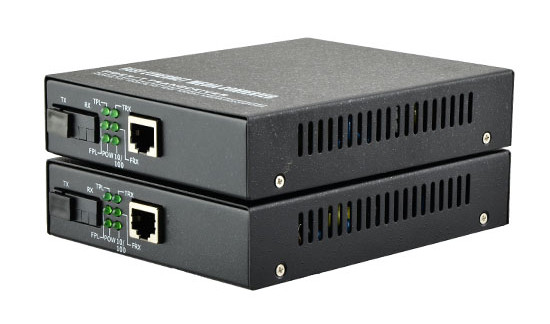
 A media converter, in the context of network hardware, is a cost-effective and flexible device intended to implement and optimize fiber links in every kind of network. Among media converters, the most often used type is a device that works as a transceiver, which converts the electrical signal utilized in copper unshielded twisted pair (UTP) network cabling to light waves used for fiber optic cabling. It is essential to have the fiber optic connectivity if the distance between two network devices is greater than the copper cabling’s transmission distance.The copper-to-fiber conversion carried out by a media converter allows two network devices having copper ports to be connected across long distances by means of fiber optic cabling.

Techopedia explains Media Converter

A media converter offers fiber-to-fiber conversion as well, from multi-mode fiber into single-mode fiber. It also converts a dual fiber link to single fiber with the help of bi-directional (BIDI) data flow. In addition, media converters have the capability to convert between wavelengths for applications that use wavelength division multiplexing (WDM).

Generally, media converters are protocol specific and they support an extensive array of data rates and network types. They are presented as physical layer or Layer 2 switching systems. Media converters that include Layer 2 switching functionality offer rate-switching as well as other innovative features.

Network intricacy, challenging applications and the increasing range of network devices drive network bandwidth and speed requirements to new extents and push longer distance requirements inside the local area network (LAN). The answer to these issues is media converters.Media converters permit fiber usage when required and integrate new devices into existing cabling infrastructure. Media converters provide flawless incorporation of fiber and copper, and various fiber forms in LAN networks. They support a multitude of protocols, media types and data rates to build a more trustworthy and cost-effective network.

Media converter characteristics:

·Expands network distances with the conversion of UTP to fiber and the extension of fiber links

·Retains investments in pre-existing devices

·Boosts the potential of present fiber with WDM wavelengths

New applications for media converters:

·Remotely handled converters and multi-port switch configurations

·Conversion of DM wavelengths to enhance the bandwidth capacity

·Facilitate fiber-to-the-desktop

What is Network Switch?

A network switch is a computer networking device that connects devices together on a computer network by using packet switching to receive, process, and forward data to the destination device. Usually, a switch serves as a controller, enabling networked devices to talk to each other efficiently. Through information sharing and resource allocation, switches save businesses money and increase employee productivity. And the network switch operates at the data link layer (Layer 2) of the Open Systems Interconnection (OSI) model called layer 2 switch, which operates at the network layer (layer 3) of the OSI model called layer 3 switch.

The relationship between switches, media converters, and OSI layers

Today’s media converters are often switches, and switches often act as media converters. Plus, both switches and media converters are frequently described in terms of layers—Layer 2, Layer 3. How can you tell what the heck you’re looking at?

Most of the confusion happens around OSI Layer 2 where Layer 1 media converters have evolved to meet basic switches. And today’s switches are rapidly advancing into Layer 3 and 4, territory formerly held by routers, muddying the waters still more.

A clear understanding of what OSI layers do, and what the differences between devices operating at different layers are, will help you select the right device.

OSI is a layered network design framework. The layers are referenced in the Open Systems Interconnection (OSI) Reference Model (which provides a layered network design framework that establishes a standard so that devices from different vendors work together). The OSI model is hierarchical. The layer at which a switch or a media converter operates determines which addressing detail it reads as data passes through.

Layer 1: media converters

Layer 1 is the Physical Layer. Media converters operating at Layer 1 only convert electrical signals and physical media without doing anything to data coming through the link.

These media converters only have two ports—one in, one out—and convert the incoming electrical signal from one cable type and then transmit it over another type—UTP to fiber, thick coax to Thin, and so on.

Layer 2: switches and media converters

Layer 2 is the Data-Link Layer. Devices operating at Layer 2 sort packets using physical network addresses, also known as MAC addresses. All network hardware is permanently assigned this number during its manufacture.

Both switches and media converters can be Layer 2 devices. Usually the only difference between a Layer 2 switch and a Layer 2 media converter is the number of ports—a device with two or three ports is called a media converter; four or more ports is called a switch. A media converter operating at Layer 2 may have more than two ports and may have ports operating at different speeds.

Devices operating at Layer 2 are very fast, but aren’t very smart because they don’t look at data packets closely. A Layer 2 media converter is considered to be fairly advanced for a media converter, but a Layer 2 switch is a basic switch. You follow?

Layer 3: switches

Layer 3 is the Network Layer. Layer 3 switches use network or IP addresses that identify locations on the network. Because they read packets more closely than Layer 2 switches do, they identify network locations as well as physical devices. A location can be a LAN workstation, an address in a computer’s memory, or even a different packet of data traveling through a network.

Switches operating at Layer 3 are smarter than Layer 2 devices and incorporate routing functions to actively calculate the best way to send a packet to its destination.

Layer 4: switches

Layer 4—the Transport Layer of the OSI model—coordinates communications between systems. Layer 4 switches are capable of identifying which application protocols (HTTP, SNTP, FTP, and so forth) are included with each packet, and use this information to hand off the packet to the appropriate higher-layer software.

Because Layer 4 devices enable you to establish priorities for network traffic based on application, you can assign a high priority to packets belonging to your vital in-house applications, with different forwarding rules for low-priority packets.

Layer 4 switches also provide an effective wire-speed security shield for a network because any company- or industry-specific protocols can be confined to only authorized switched ports or users. This security feature is often reinforced with traffic filtering and forwarding features.

High-end vs. low-end switches

Switches can also be considered low end or high end. A low-end switch operates in Layer 2 of the OSI model and can also operate in a combination of Layers 2 and 3. High-end switches operate in Layer 3, Layer 4, or a combination of the two.

Conclusion

Media converters can be used anywhere in the network to integrate newer technology with existing equipment to support new applications, technologies and future growth. Layer 2 and layer 3 network switches are also widely deployed in enterprise and data center for higher speed and more capacity. Fiber-Mart provides both media converters and managed network switches for your option. You can choose the most suitable one according to your specific needs:product@fiber-mart.com

What are MTP / MPO Fiber Cables?

by http://www.fiber-mart.com

MTP/MPO — High-Density Fiber Optic Cabling
The quantity of data transmitted worldwide is growing exponentially and the need for ever-greater bandwidths is unrelenting. Though the current data volumes demanded in backbone cabling can still be handled with 10 GbE, the forecast trends will require the introduction of the next technologies, 40 GbE and 100 GbE. As a result, data centers must respond to provide sufficient capacities and plan for upcoming requirements. To meet this demand, 40G QSFP+ transceivers, MTP/MPO cables and other related products are now in the market. MTP/MPO cables in the data centers play an important role in ultra-high density cabling.
Why are MTP/MPO Cables Used?
The number of network connections in data centers is rising rapidly. Traditional fiber cables can make the data center crammed and difficult to manage. To solve this problem, data centers have to achieve ultra-high density in cabling to accommodate all of the cabling required. The MTP/MPO cables, which bring together 8, 12 or 24 fibers in a single interface have been proven to be a practical solution. Incorporating to meet the 40GBASE-SR4 and 100GBASE-SR10 standard, The MTP/MPO multi-fiber connector of MTP/MPO cables is about the same size as a SC connector but can accommodate 8, 12 or 24 fibers, thus offering savings in circuit card and rack space.
Details of MTP/MPO Cables
MTP/MPO cables are composed of MTP/MPO connectors and fiber optic cables, other connectors such as LC may also be found in some kinds of MTP/MPO cables. The fiber cables used are generally OM3 and OM4, which are laser optimized multi-mode optical fibers. It is important to have an overall understanding of MTP/MPO connectors (known as multi-fiber push-on and also as multi-path push-on).
MPO connectors are available in a female version (without pins), or a male version (with pins) as shown in the following picture. The pins ensure the exact alignment of the fronts of the connectors, and also they ensure the end faces of the fibers are not offset.
Noses and guide grooves (key) on the top side are the two other clearly visible features, which ensures the adapter hold the connector with the correct ends aligned with each other. Based on the placement of the key, two types of MPO adapters are available. One is “key-up to key-down”. It means the key is up on one side and down on the other. The two connectors are connected turned 180° in relation to each other. The other one is “key-up to key-up”. It means both keys are up. The two connectors are connected while in the same position in relation to each other.
Connection Rule
Always use one male connector and one female connector plus one MPO adapter when creating a MPO connection.
Never connect a female to a female or a male to a male. It should be connected with a male and a female as stated above. With a female-to-female connection, the fiber cores of the two connectors will not be at the exact same height because the guide pins are missing. That will lead to losses in performance. A male-to-male connection has even more disastrous results. There the guide pins hit against guide pins so no contact is established. This can also damage the connectors.
Never dismantle a MPO connector. The pins are difficult to detach from a MPO connector and the fibers might break in the process. In addition, the warranty becomes null and void if you open the connector housing.
MTP/MPO Cables
MTP/MPO Cable has the advantages of shorter installation times, tested and guaranteed quality and greater reliability. It has several different kinds of types.
Trunk Cables: trunk cables serve as a permanent link connecting the MTP/MPO modules to each other. They are available with 12, 24, 48 and 72 fibers. Their ends are terminated with 12-fiber or 24-fiber MTP/MPO connectors according to customer’s choice. These trunk cables like 12 fibers MPO trunk cable could help to create a simple, cost-effective 40G networking by installing a structured cabling system. MTP/MPO trunk cable requires greater care in planning but has a number of advantages, such as higher quality, minimal skew, shorter installation time, better protection, smaller volume of cable and lower total costs.
Harness Cables: harness cables provide a transition from multifiber cables to individual fibers or duplex connectors. For instance, 8 fibers 12 strands MTP/MPO harness cable has eight LC high fiber density connectors and a MPO connector, which is convenient for wiring and management system in 40G network with stable performance.
Y Cables: Y cables are generally used in the 2-to-1 version. A typical application is to join two 12-fiber trunk cables to a 24-fiber patch cord as part of a migration to 100 GbE. The rather rare version of 1 to 3 allows three eight-fiber MTP/MPO connectors to be joined to a 24-fiber permanent link, e.g. for migration to 40 GbE.
MTP/MPO Solutions for 40 Gigabit Ethernet Cabling
OM3 and OM4 fiber optic cables put in a parallel optical connection, terminated with MTP/MPO connectors. These are the ingredients for 40 GbE technology in a structured cabling environment. Parallel optical channels with multifiber multimode optical fibers of the categories OM3 and OM4 are used for implementing 40 GbE. The small diameter of the optical fibers poses no problems in laying the lines, but the ports suddenly have to accommodate four or even ten times the number of connectors. This large number of connectors can no longer be covered with conventional individual connectors. So the 802.3ba standard incorporated the MPO connector for 40GBASE-SR4.
Summary
MTP/MPO connectors and cables are the central components of a 40G parallel optical link. This connection decides whether the insertion loss exceeds the attenuation budget and whether the return loss is high enough. In the end, the desired bandwidth can only be reached if all components in a parallel optical link satisfy the highest requirements.

Why the MTP Connector is Going to Change the Cabling World

by http://www.fiber-mart.com

Until June of 2010, before the ratification of the IEEE 802.3ba, the MTP® connector’s major benefit was installation speed and reduction of bulk cordage. The 802.3ba standard offered a roadmap for manufacturers to develop 40/100G Ethernet projects. Arguably one of the most dynamic changes in the cabling infrastructure world, this standard called for the use of the MTP (MPO style) for multimode fiber cabling infrastructures.
MTP / MPO – A Game Changer
Before I get into telling you why it’s going to change the world, I should first explain MTP vs. MPO style connector. MTP is a popular brand name of an MPO style connector. In other words, MPO is the official name of the type of connector, but MTP is a very popular brand name. Much like “Band-Aid” is to “adhesive bandage.”
The 802.3ba standard calls for the use of the MTP connector in multimode fiber cabling infrastructures. The main reason for this is cost.
40 and 100G Ethernet cannot be obtained utilizing standard short range optics (transceivers) that utilize VCSEL (Vertical Cavity Surface Emitting Lasers), running over a standard serial connection. A serial connection is when one fiber is used for transmit and the other fiber used for receive. This is the standard duplex connection that most are familiar with in fiber cabling.
Enter “parallel optics” – this is where multiple fibers are aggregated to transmit multiple 10G signals each. For 40G there will be (4) 10G fibers transmitting and (4) 10G signals coming back (Rx and Tx). This short video does a great job in explaining how this works.
So how is this going to change the cabling world?
Well, most data center fiber infrastructures are based on a duplex, or serial, connection system. LC, SC and ST connectors are prominent. This changeover to the MTP will be required to run 40/100G Ethernet speeds (unless using expensive LX optics which are cost prohibitive to most).
This turns the cabling infrastructure upside down. MTP’s need to be incorporated into the mix – and the sooner the better! Many times, new hardware is purchased and the cabling is an afterthought. If this is the case, then there will be a rude awakening if one plans on using multimode fiber. Do your research before investing in new cabling now…it will pay off later!

MTP/MPO cable Polarity

by http://www.fiber-mart.com

MTP/MPO Polarity
Today in professional networks Structured cabling, fiber cables 12 MTP / MPO are used frequently to conexionar equipment for its small size and high versatility. The aim is to unite the transmission signal (Tx) on a switch port to the signal corresponding receiving (Rx), this feature is called polarity. Unlike duplex traditional Fibre Optic Cable – LC or SC patched with a Tx and Rx connector on each end-MTP cable 12 fibers coalesce 12 fibers in one MPO connector, so management polarity becomes more complex. According to TIA standards, there are three types of polarity: type A, type B and type C. Different types of polarity cables may have different applications. We will introduce particularly cable polarity MTP type B and its applications.
General information about MTP / MPO cable Polarity Type-A, Type-B and Type-C
A cable type is standard for the second polarity, and extremely versatile. This cable assembly can be used to connect directly between 40G QSFP + optical transceivers, so it is commonly known as QSFP / QSFP + cable or 40GBASE-SR4 direct connection. As you can see in the diagram, this cable has a polarity “straight” and will lead to Pin 1 to Pin 12 relationship. This is very useful because the 40G optical use parallel optics, ie, instead of alternating Tx and Rx in a double-sided pattern, the port will look like the following diagram.
Often it referred to as MTP 40G cable, the cable type B standard for the second polarity, and extremely versatile. This cable assembly can be used to connect directly between 40G QSFP + optical transceivers, so it is commonly known as QSFP / QSFP + cable or 40GBASE-SR4 direct connection. As you can see in the diagram, this cable has a polarity “crusade” and will lead to Pin 1 to Pin 12 relationship. This is very useful because the 40G optical use parallel optics, ie, instead of alternating Tx and Rx in a double-sided pattern, the port will look like the following diagram.
Often referred to as MTP 40G cable, the cable is the third type C standard for polarity, and extremely versatile. This cable assembly can be used to connect directly between 40G QSFP + optical transceivers, so it is commonly known as QSFP / QSFP + cable or 40GBASE-SR4 direct connection. As you can see in the diagram, this cable has a polarity “cross pairs” and will lead to Pin 1 to Pin 12 relationship. This is very useful because the 40G optical use parallel optics, ie, instead of alternating Tx and Rx in a double-sided pattern, the port will look like the following diagram.
Most 40G fiber optic networks do not require perfect symmetry of ports: any Tx Rx can go anywhere. This means that the fiber 12 may interact with fiber 1 because it is Tx and Rx connector inserted therein, but at the other end.
MTP Cable types with polarity A, B and C
12-fiber cable MTP / MPO and MTP / MPO cable LC 4xDúplex are most commonly used in data centers. Genres MTP / MPO are divided into male and female. Therefore, in terms of trunk cable MTP, there are three types of combinations: female-female, male-female and male-male. 4xDúplex LC for cable are also available with MTP / MPO Male-Female cable.
The most used are the MTP / MPO connectors female.
MTP / MPO Cable Applications
Since the MTP / MPO cables have male and female, 1 male and 1 female to be interconnected it is required. Male pins fit into the female guide holes to ensure accurate alignment of fiber. The structure of the male and female connectors makes the connection between the same gender can not occur without signal loss or damaged connector itself. In the case of opposite gender confront a simple or necessary to perfectly align these adapter lossless substantial signal adapter panel.

How to Select the Right Rack Mount Fiber Enclosure?

Currently,Rack mount fiber enclosure has become increasingly popular in data centers to ensure better cable management and maintenance. Fiber enclosure can provide easy-to-manage cabling environments and strong protection for fiber optic cables. And This article is about How to Select the Right Rack Mount Fiber Enclosure for your network?

Currently,Rack mount fiber enclosure has become increasingly popular in data centers to ensure better cable management and maintenance. Fiber enclosure can provide easy-to-manage cabling environments and strong protection for fiber optic cables. And This article is about How to Select the Right Rack Mount Fiber Enclosure for your network?


Types and Designs of Rack Mount Fiber Enclosures

As one of the most commonly used fiber enclosures in data center, rack mount fiber enclosure provides a convenient and rugged termination point for fiber jumper cables. This rack mount enclosures offer a flexible connectivity system using a variety of adapter plates and MPO cassettes.


Rack Mount Enclosures Configurations

The rack mount enclosure is generally made for standard 19 inch rack mounting. Depending on the number of connections required, they are available in one or more rack units (RU) height configurations, such as 1RU, 2RU or 4RU, etc. you should choose the most proper one depending on space and port requirement of your network.

图片1


Rack Mount Fiber Enclosures Applications

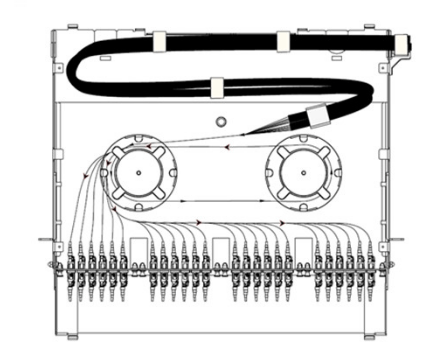
Fiber enclosure has various designs and applications. Basically, rack mount fiber enclosures can be used in the following three circumstances, which are depended on the accessories that are installed on the fiber enclosure. The following will take a slide-out 1RU rack mount fiber enclosure as example to illustrate the applications of the fiber enclosures in data center. Installed with splice trays, fiber adapter panels and MTP cassettes separately, fiber enclosure can provide cabling environment for different connections.

For Fiber Splicing Joints

For fiber splicing joints in fiber enclosures, splice tray and FAPs are needed. When installing four fiber adapter panels on the front panel and one or more splicing trays inside the enclosure drawer, this fiber enclosure can provide cable management and protection for splicing joints and connections.

1-1.png

For Patch Cord Connections

This kind of fiber enclosure usage is very common. Simply by installing two slack spools and four fiber patch panel on the fiber enclosure, it could make fiber patch cables management much easier. The following picture shows a breakout fiber patch cable installed in the fiber enclosure and being well organized by the spools.

2-2.png

Installing HD MTP Cassettes

Up to four MTP Cassettes can be installed in this 1U fiber enclosure, which can provide 40G/100G to 10G high cabling density and easy transferring from MTP interface to LC interface.

3.png

Conclusion

Choosing an affordable rack mount fiber enclosure that within your installation budget serves as a basic requirement, However, a premium rack mount fiber enclosure is a durable item that will provide services for years to come. Fiber-MART provide customized service to fit whatever application you require. For more information , pls not hesitate to contact me at service@fiber-mart.com

What’s the Difference Between Singlemode and Multimode Fiber Patch Cables?

by http://www.fiber-mart.com

When searching the Internet for network fiber patch cables, the first decision you often encounter is singlemode or multimode. Hopefully, I can make that decision easier for you by explaining the differences between the two, and why you should choose one over the other.
The Core of the Matter
First and foremost, the core of all fiber cables carries light to transmit data. The main difference between singlemode and multimode fiber patch cables is the size of their respective cores. Singlemode cables have a core of 8 to 10 microns. In singlemode cables, light travels toward the center of the core in a single wavelength. This focusing of light allows the signal to travel faster and over longer distances without a loss of signal quality than is possible with multimode cabling. Multimode cables have a core of either 50 or 62.5 microns. In multimode cables, the larger core gathers more light compared to singlemode, and this light reflects off the core and allows more signals to be transmitted. Although more cost-effective than singlemode, multimode cabling does not maintain signal quality over long distances.
The Best Choice for Your Application
Singlemode Fiber Patch Cables are the best choice for transmitting data over long distances. They are usually used for connections over large areas, such as college campuses and cable television networks. They have a higher bandwidth than multimode cables to deliver up to twice the throughput. Most singlemode cabling is color-coded yellow.
Multimode Fiber Patch Cables are a good choice for transmitting data and voice signals over shorter distances. They are typically used for data and audio/visual applications in local-area networks and connections within buildings. Multimode cables are generally color-coded orange or aqua; the Aqua Fiber Patch Cables are for higher performance 10Gbps, 40Gbps, and 100Gbps Ethernet and fiber channel applications.