An introduction to fiber cable pushing machines

by http://www.fiber-mart.com

Since they were first introduced in the 1980s, optical fiber cables have dramatically shrunk in size. A 96 fiber cable can now weigh 30kg/km (down from 300kg/km) and have a diameter of 7mm, compared to 20mm for first generation cables.
Similarly, 12 fiber drop cables used to connect individual FTTH customers now weigh less than 10kg/km and have a diameter of 1-3mm. These are normally installed into microducts, which typically range in outside diameter size from 3-18mm.
This leads to new challenges for installers when it comes to equipment. Previously cables would have been installed with heavy equipment, such as winches and capstans, or heavy compressors and blowing heads. However, this has four big disadvantages in the last drop:
1. People
It requires multiple operators, pushing up costs.
2. Disruption and mess
Customers don’t want bulky equipment in their buildings or apartments, particularly if it damages their homes.
3. Equipment cost
Operators need to invest in buying or hiring expensive machines to carry out installations.
4. Time
While the cable install itself may not take long, setting up (and dismantling machines) is time-consuming, limiting the number of installs that can be completed in a day.
What is a handheld pushing machine?
What is needed is a single operator, a self-contained installation head and low-cost, lightweight ancillary apparatus. For example, this handheld pushing machine caters for cables from 2 to 5.5m diameter and microducts from 5 to 12.7mm outer diameter.
It’s necessary to understand a little of the science behind “pushing” to see how it can be used. When pushing there is no cable tension, meaning that, unlike pulling, the challenge is not one of over-straining the cable, but in forcing the cable to buckle by over-pushing. Buckling the cable effectively locks it into the duct and can cause permanent damage.
This can be controlled by controlling and optimizing the cable stiffness and by reducing the coefficient of friction between the duct and cable. While low friction is always beneficial, stiffness is a compromise. It needs to be sufficient high to tolerate the push force exerted by the head, but low enough to enable to cable to flex around curves in the route.
Cable pushing machines typically exert around 40 to 50N of push force at the drive system, which can be a belt or driven wheels. Provided that the microduct’s internal diameter is a relatively close fit (for example no larger than a 6mm bore for a 3-4mm cable) there is no danger of the cable kinking at these force levels. This means that, for a low friction duct, a push distance of 100 to 200m is possible, depending on the degree of bend in the route.
In practice, this enables installers to deploy the majority of drop cable connections by using pushing machines.To meet these contrasting needs you need a cable designed specifically for pushing. The relatively hard polymer used as a jacket confers low friction properties when used with optimally lined microducts, providing the right level of stiffness to avoid the risk of buckling – while still having the flexibility to push around corners.
Of course, even a pushing machine requires a power source and in the interests of simplicity and cost many use a standard 10.8V Euro/12V Li-ion US unit.
Adding air assistance
Despite the optimization of pushable cables, there will always be instances where pushing alone is insufficient to deliver the required installation. For example, the route may curve unexpectedly or the actual install length may be longer than planned. In these situations air assistance will be required.
For this reason, most high quality pushing machines provide an optional inlet for compressed air sources of up to around 12-15 bar. Whereas pushing puts the cable into mild compression, the use of a high speed air flow brings a distributed force to bear on the cable, which eases it around any significant bends, meaning that the install length can be extended to over 1km. The good news is that the same ultra-low friction duct used for cable pushing provides the same excellent properties when used for air assisted deployments.
When adding air, it is important to use the right type of source. Large, wheeled and towed petrol compressors provide ample air but aren’t necessarily appropriate quality for installation.
The user needs to determine the air pressure and volume needed, although pushing equipment manufacturers can advise on this. Additionally, they need to set the degree of filtering and contaminant removal. This is because it is vital to remove moisture from the air supply using an after-cooler and water filter and to take out any residual hydrocarbons, since both of these contaminants interfere with effective blowing. One way to achieve this is to use an air cylinder which contains clean air under high pressure (alternatively a compressed nitrogen tank will work).
However, for those users who want to avoid the logistical issues associated with obtaining and returning a large number of cylinders, a small compressor remains the best option. Historically 10 bar and 15 bar compressors have provided relatively large air outputs (measured in cubic feet per minute (CFM) or cubic meters per minute (m3/min)). A substantial compressor will generate in excess of 1 m3/min but will weigh around 100kg. Such a size rules out single operator working and necessitates specialized vehicles to transport the compressor.
Coping with leakage
In the past, one of the reasons that users tended to opt for these large machines was that older style blowing heads lost a large volume of air through leakage. This meant that a modest air supply wouldn’t let cables be pushed “hard” enough to ensure they reached their destination.
However, recent work has led to the availability of one-person portable compressors. These weigh around 25kg in weight, meaning that the pushing machine and its ancillary compressor can be handled and transported by a single person in a standard commercial vehicle. This further brings down staff costs and makes pushing available for a wider range of installs.
Pushing to the future
Installers have three options when it comes to last drop deployments – blowing, pulling or pushing cables. Given the relatively short runs and often complex routes of the last drop, pushing cables is becoming much more common as an option. Using a pushing machine extends the usefulness and range of this technique, helping to bring down last drop install costs and speed up deployments. Particularly when used in combination with cable and microduct designed for pushing, they deliver major budgetary and time benefits. This means they should now be a standard part of every operator’s toolbox when carrying out FTTH deployments.
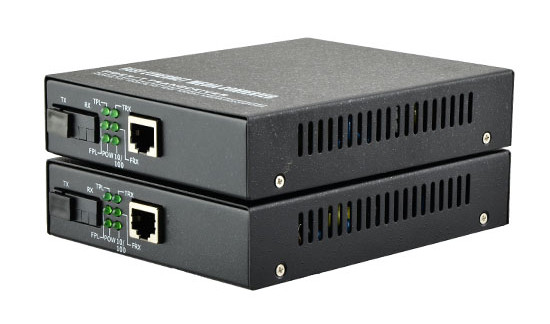
Difference Between Media Converter and Network Switch

Media converter and network switch are both widely used in today’s high speed network applications. In some scenes, one can used to replace another one. Then, which one should I choose for my network? What is the difference between media converter and network switch? This post will cover the knowledge of media converter and network switch, and explain the difference between.

Media converter and network switch are both widely used in today’s high speed network applications. In some scenes, one can used to replace another one. Then, which one should I choose for my network? What is the difference between media converter and network switch? This post will cover the knowledge of media converter and network switch, and explain the difference between.

 What does Media Converter mean?

 A media converter, in the context of network hardware, is a cost-effective and flexible device intended to implement and optimize fiber links in every kind of network. Among media converters, the most often used type is a device that works as a transceiver, which converts the electrical signal utilized in copper unshielded twisted pair (UTP) network cabling to light waves used for fiber optic cabling. It is essential to have the fiber optic connectivity if the distance between two network devices is greater than the copper cabling’s transmission distance.The copper-to-fiber conversion carried out by a media converter allows two network devices having copper ports to be connected across long distances by means of fiber optic cabling.

Techopedia explains Media Converter

A media converter offers fiber-to-fiber conversion as well, from multi-mode fiber into single-mode fiber. It also converts a dual fiber link to single fiber with the help of bi-directional (BIDI) data flow. In addition, media converters have the capability to convert between wavelengths for applications that use wavelength division multiplexing (WDM).

Generally, media converters are protocol specific and they support an extensive array of data rates and network types. They are presented as physical layer or Layer 2 switching systems. Media converters that include Layer 2 switching functionality offer rate-switching as well as other innovative features.

Network intricacy, challenging applications and the increasing range of network devices drive network bandwidth and speed requirements to new extents and push longer distance requirements inside the local area network (LAN). The answer to these issues is media converters.Media converters permit fiber usage when required and integrate new devices into existing cabling infrastructure. Media converters provide flawless incorporation of fiber and copper, and various fiber forms in LAN networks. They support a multitude of protocols, media types and data rates to build a more trustworthy and cost-effective network.

Media converter characteristics:

·Expands network distances with the conversion of UTP to fiber and the extension of fiber links

·Retains investments in pre-existing devices

·Boosts the potential of present fiber with WDM wavelengths

New applications for media converters:

·Remotely handled converters and multi-port switch configurations

·Conversion of DM wavelengths to enhance the bandwidth capacity

·Facilitate fiber-to-the-desktop

What is Network Switch?

A network switch is a computer networking device that connects devices together on a computer network by using packet switching to receive, process, and forward data to the destination device. Usually, a switch serves as a controller, enabling networked devices to talk to each other efficiently. Through information sharing and resource allocation, switches save businesses money and increase employee productivity. And the network switch operates at the data link layer (Layer 2) of the Open Systems Interconnection (OSI) model called layer 2 switch, which operates at the network layer (layer 3) of the OSI model called layer 3 switch.

The relationship between switches, media converters, and OSI layers

Today’s media converters are often switches, and switches often act as media converters. Plus, both switches and media converters are frequently described in terms of layers—Layer 2, Layer 3. How can you tell what the heck you’re looking at?

Most of the confusion happens around OSI Layer 2 where Layer 1 media converters have evolved to meet basic switches. And today’s switches are rapidly advancing into Layer 3 and 4, territory formerly held by routers, muddying the waters still more.

A clear understanding of what OSI layers do, and what the differences between devices operating at different layers are, will help you select the right device.

OSI is a layered network design framework. The layers are referenced in the Open Systems Interconnection (OSI) Reference Model (which provides a layered network design framework that establishes a standard so that devices from different vendors work together). The OSI model is hierarchical. The layer at which a switch or a media converter operates determines which addressing detail it reads as data passes through.

Layer 1: media converters

Layer 1 is the Physical Layer. Media converters operating at Layer 1 only convert electrical signals and physical media without doing anything to data coming through the link.

These media converters only have two ports—one in, one out—and convert the incoming electrical signal from one cable type and then transmit it over another type—UTP to fiber, thick coax to Thin, and so on.

Layer 2: switches and media converters

Layer 2 is the Data-Link Layer. Devices operating at Layer 2 sort packets using physical network addresses, also known as MAC addresses. All network hardware is permanently assigned this number during its manufacture.

Both switches and media converters can be Layer 2 devices. Usually the only difference between a Layer 2 switch and a Layer 2 media converter is the number of ports—a device with two or three ports is called a media converter; four or more ports is called a switch. A media converter operating at Layer 2 may have more than two ports and may have ports operating at different speeds.

Devices operating at Layer 2 are very fast, but aren’t very smart because they don’t look at data packets closely. A Layer 2 media converter is considered to be fairly advanced for a media converter, but a Layer 2 switch is a basic switch. You follow?

Layer 3: switches

Layer 3 is the Network Layer. Layer 3 switches use network or IP addresses that identify locations on the network. Because they read packets more closely than Layer 2 switches do, they identify network locations as well as physical devices. A location can be a LAN workstation, an address in a computer’s memory, or even a different packet of data traveling through a network.

Switches operating at Layer 3 are smarter than Layer 2 devices and incorporate routing functions to actively calculate the best way to send a packet to its destination.

Layer 4: switches

Layer 4—the Transport Layer of the OSI model—coordinates communications between systems. Layer 4 switches are capable of identifying which application protocols (HTTP, SNTP, FTP, and so forth) are included with each packet, and use this information to hand off the packet to the appropriate higher-layer software.

Because Layer 4 devices enable you to establish priorities for network traffic based on application, you can assign a high priority to packets belonging to your vital in-house applications, with different forwarding rules for low-priority packets.

Layer 4 switches also provide an effective wire-speed security shield for a network because any company- or industry-specific protocols can be confined to only authorized switched ports or users. This security feature is often reinforced with traffic filtering and forwarding features.

High-end vs. low-end switches

Switches can also be considered low end or high end. A low-end switch operates in Layer 2 of the OSI model and can also operate in a combination of Layers 2 and 3. High-end switches operate in Layer 3, Layer 4, or a combination of the two.

Conclusion

Media converters can be used anywhere in the network to integrate newer technology with existing equipment to support new applications, technologies and future growth. Layer 2 and layer 3 network switches are also widely deployed in enterprise and data center for higher speed and more capacity. Fiber-Mart provides both media converters and managed network switches for your option. You can choose the most suitable one according to your specific needs:product@fiber-mart.com

How to Select the Right Rack Mount Fiber Enclosure?

Currently,Rack mount fiber enclosure has become increasingly popular in data centers to ensure better cable management and maintenance. Fiber enclosure can provide easy-to-manage cabling environments and strong protection for fiber optic cables. And This article is about How to Select the Right Rack Mount Fiber Enclosure for your network?

Currently,Rack mount fiber enclosure has become increasingly popular in data centers to ensure better cable management and maintenance. Fiber enclosure can provide easy-to-manage cabling environments and strong protection for fiber optic cables. And This article is about How to Select the Right Rack Mount Fiber Enclosure for your network?


Types and Designs of Rack Mount Fiber Enclosures

As one of the most commonly used fiber enclosures in data center, rack mount fiber enclosure provides a convenient and rugged termination point for fiber jumper cables. This rack mount enclosures offer a flexible connectivity system using a variety of adapter plates and MPO cassettes.


Rack Mount Enclosures Configurations

The rack mount enclosure is generally made for standard 19 inch rack mounting. Depending on the number of connections required, they are available in one or more rack units (RU) height configurations, such as 1RU, 2RU or 4RU, etc. you should choose the most proper one depending on space and port requirement of your network.

图片1


Rack Mount Fiber Enclosures Applications

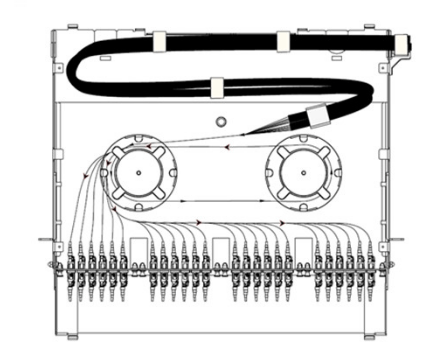
Fiber enclosure has various designs and applications. Basically, rack mount fiber enclosures can be used in the following three circumstances, which are depended on the accessories that are installed on the fiber enclosure. The following will take a slide-out 1RU rack mount fiber enclosure as example to illustrate the applications of the fiber enclosures in data center. Installed with splice trays, fiber adapter panels and MTP cassettes separately, fiber enclosure can provide cabling environment for different connections.

For Fiber Splicing Joints

For fiber splicing joints in fiber enclosures, splice tray and FAPs are needed. When installing four fiber adapter panels on the front panel and one or more splicing trays inside the enclosure drawer, this fiber enclosure can provide cable management and protection for splicing joints and connections.

1-1.png

For Patch Cord Connections

This kind of fiber enclosure usage is very common. Simply by installing two slack spools and four fiber patch panel on the fiber enclosure, it could make fiber patch cables management much easier. The following picture shows a breakout fiber patch cable installed in the fiber enclosure and being well organized by the spools.

2-2.png

Installing HD MTP Cassettes

Up to four MTP Cassettes can be installed in this 1U fiber enclosure, which can provide 40G/100G to 10G high cabling density and easy transferring from MTP interface to LC interface.

3.png

Conclusion

Choosing an affordable rack mount fiber enclosure that within your installation budget serves as a basic requirement, However, a premium rack mount fiber enclosure is a durable item that will provide services for years to come. Fiber-MART provide customized service to fit whatever application you require. For more information , pls not hesitate to contact me at service@fiber-mart.com

Cut Out Costly Mistakes With Fiber Optic Cleaver

To get good fiber optic splices or terminations, especially when using the pre-polished connectors with internal splices, it is extremely important to cleave the fiber properly. Imprecisely cleaving of the fiber ends, therefore, will result in improper matching. So, the end of the fiber must be cleaved to a 90 degree flat end when it is prepared for a connector or splice. However, technicians often encountered the problem that the end of the fiber strand is so small, making it is impossible to tell whether the strand has a flat end. To ensure smooth and precise fiber cleaving, a fiber optic cleaver is much needed. And in this article, we will offer you some useful information about fiber optic cleaver.

To get good fiber optic splices or terminations, especially when using the pre-polished connectors with internal splices, it is extremely important to cleave the fiber properly. Imprecisely cleaving of the fiber ends, therefore, will result in improper matching. So, the end of the fiber must be cleaved to a 90 degree flat end when it is prepared for a connector or splice. However, technicians often encountered the problem that the end of the fiber strand is so small, making it is impossible to tell whether the strand has a flat end. To ensure smooth and precise fiber cleaving, a fiber optic cleaver is much needed. And in this article, we will offer you some useful information about fiber optic cleaver.

What is Cleaving or Fiber Cleaver?

Cleaving is the process by which an optical fiber is “cut” or precisely broken for termination or splicing. Just like cutting glass plate, fiber is cut by scoring or scratching the surface and applying stress so the glass breaks in a smooth manner along the stress lines created by the scratch. Properly done, the fiber will cleave with a clean surface perpendicular to the length of the fiber, with no protruding glass on either end.

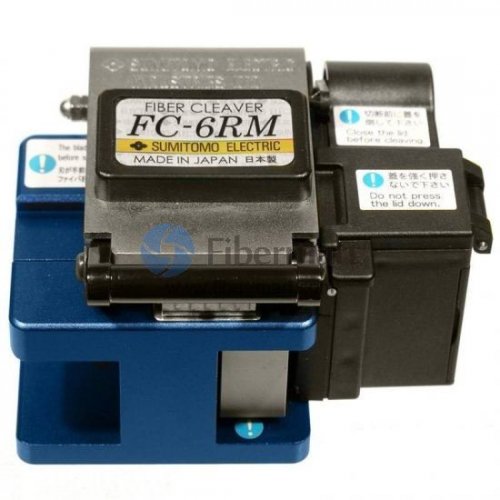
A fiber cleaver is a tool that holds the fiber under low tension, scores the surface at the proper location, then applies greater tension until the fiber breaks. Good cleavers are automatic and produce consistent results, irrespective of the operator. With good fiber cleavers, you only need to clamp the fiber into the cleaver and operate its controls, then fiberglass is cleaved automatically. However, some cleavers are less automated and require operators to exert force manually to cut the fiber cable, which makes it difficult to predict and control the force. The good cleavers are called as precision cleavers, while the less automated ones are called as cheap or scribe cleavers, which will be introduced in the next part.

Two Types of Fiber Optic Cleavers

We know that the closer to 90 degrees the cleave is, the greater chance you will have to match it with another cleaved fiber, then be spliced or mated by a connector. Thus, a proper tool with good technique is demanded for consistently achieving a 90 degree flat end. Good cleavers are automatic and can produce consistent results, irrespective of the operator. The user only needs to clamp the fiber into the cleaver and operate its controls. Some cleavers are less automated, making them more dependent on operator technique and therefore less predictable. There are basically two broad categories of fiber optic cleavers: scribe cleavers and precision cleavers.

Scribe Cleavers

This type is based on a traditional cleaving method. It is typically used to remove excess fiber from the end of a connector before polishing, simply by using a hand tool called scribe. Scribe cleavers are usually shaped like ballpoint pens with diamond tipped wedges or come in the form of tile squares. The scribe has a hard, sharp tip, generally carbide or diamond, which is used to scratch the fiber manually. Then the operator pulls the fiber to break it. Since both the scribing and breaking process are under manual control, this method varies greatly in repeatability. Most field and lab technicians shy away from these cleavers as they are not accurate. However, if used in skilled hands, this scribe cleaver reduces the cost significantly for repairs, installation, and training classes.

Precision Cleavers

Precision cleavers are the most commonly used cleavers in the industry. They use a diamond or tungsten wheel/blade to provide the nick in the fiber. Tension is then applied to the fiber to create the cleaved end face. The advantage of these cleavers is that they can produce repeatable results through thousands of cleaves by simply rotating the wheel/blade accordingly. Although more costly than scribe cleavers, precision cleavers can cut multiple fibers at one time with increased speed, efficiency, and accuracy. While in the past, scribe cleavers were widely used for fiber cleaving, precision cleavers are now developed to support various applications and multiple fiber cleaving. Precision cleavers contribute to better cleave, which ensures low splice loss and precision cleavers, besides, its blades have a much longer life span.

Operation method

1.Verify that the device has the blade sliding plate in front of one end, open the size platen;

2.Stripped fiber coating stripping fiber clamp reserve bare fiber length of 30-40mm, to wrap fiber, cotton wool or tissue dipped in alcohol then clean fiber. Rub with cotton wool or tissue paper, do not use the same cotton wool or tissue paper to rub the second (Note: Please use plain Greater than 99% alcohol).

3.Visual edge alignment of the fiber coating cutter ruler (12-20cm) appropriate scale, the left hand placed in the optical fiber oriented pressure tank the bare fiber placed straight on the left and right rubber mat.

4.Together on a small plate, large platen to promote devices blade slider the blade dicing fiber under surface, and is free to slide to the other side, cut fiber;

5.The left hand held onto the cutter, the right hand to open a large pressure plate and remove fiber debris into fixed container.

6.Pinch the optical fiber with the left hand while the right hand to open the small pressure plate, carefully remove the fiber cut end face, attention: the neat fiber cross-section do not touch it matter.

The advantages of fiber optic cleaver

1.Excellent beam quality of a smaller of focal diameter and high working efficiency, high quality;

2.High cutting speed: cutting speed greater than 10m/min;

3.Stable operation: the world’s top import fiber optic lasers, stable performance, key parts can reach 100,000 hours;

4.The high efficiency of photoelectric conversion: Compare with CO2 laser cutting machine, fiber optic laser cutting machine have three times photoelectric conversion efficiency;

5.Low cost: to save energy and protect the environment Photoelectric conversion rate as high as 25-30%. The low power consumption, which is the traditional CO2 laser cutting machine is only about 20% -30%;

6.Low maintenance costs: fiber line transmission, no need reflect lens, save maintenance costs;

7.Simple operation: optical fiber transmission lines, there is no adjustment of the optical path;

8.Super flexible optical effects: compact design, compact and easy to flexible manufacturing requirements.

Tips on Choosing Fiber Cleavers

1. Select fiber cleavers according to your application requirements. Fiber cleavers, designed for fusion splicing, need a low average angle that is one degree or less, whereas cleavers appropriate for mechanical connectors require angles below three degrees. So determine whether you require a single-fiber or multi-fiber cleaver before you cleave the fibers at one time.

2.Think twice before purchasing a cleaver built into a splicer. If you intend to purchase the built-in cleavers, you must check whether the cleaver or splicer requires maintenance. It may cause inconvenience to technician if they loses valuable tools, which can hold up the job at hand.

3.Purchase a cleaver with the latest automation features that can save a lot of labour and time. Fiber cleavers are always continuing to evolve with new and improved features, such as automated fiber scrap collection, automated scoring mechanisms, and the latest automatic blade rotation technology.

Conclusion

Precise cleaving is the premise of successful fusion splicing. Thus the quality of the fiber cleavers directly determines the quality of fiber optic splices or terminations. If the fiber ends were not cleaved perfectly, fiber loss would occur which would in turn affect the transmission of signals. To buy reliable and high precision fiber cleavers, please visit Fiber-Mart or contact us via product@fiber-mart.com.

 Fiber Optic Power Meter

Important specifications for fiber optic power meters include wavelength range, optical power range, power resolution and power accuracy. Some devices are rack-mounted or handheld. Today we will focus on fiber optic power meters.

Important specifications for fiber optic power meters include wavelength range, optical power range, power resolution and power accuracy. Some devices are rack-mounted or handheld. Today we will focus on fiber optic power meters.


What does Optical Power Meter (OPM)mean?

An optical power meter (OPM) is a device used measure the power in an optical signal. The term usually refers to a device for testing average power in fiber optic systems. Other general purpose light power measuring devices are usually called radiometers, photometers, laser power meters (can be photodiode sensors or thermopile laser sensors), light meters or lux meters.

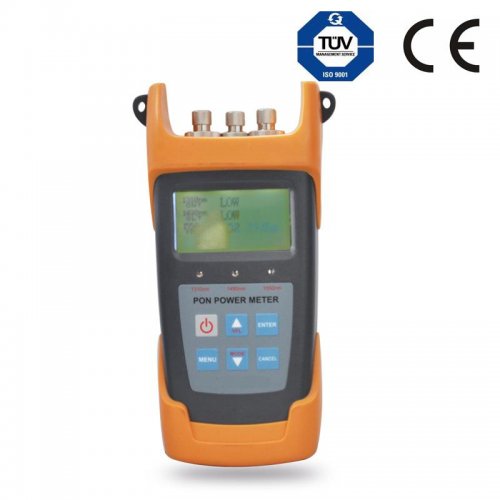
An optical power meter (OPM) is a testing instrument used to accurately measure the power of fiber optic equipment or the power of an optical signal passed through the fiber cable. It also helps in determining the power loss incurred to the optical signal while passing through the optical media. An optical power meter is made up of a calibrated sensor that measures amplifier circuit and a display. The sensor normally consists of a silicon (Si), germanium (Ge) or indium gallium arsenide (InGaAs) based semiconductor. The display unit shows the measured optical power and the corresponding wavelength of the optical signal.


Explains Optical Power Meter (OPM)


OPM calibrates the wavelength and measures the power of an optical signal. Before testing, the required wavelength is set manually or automatically. Accurate calibration of the signal wavelength is necessary for accurate measurement of power level, otherwise the test may yield false reading.

Different sensor types used in OPMs have different characteristics. For example, Si sensors tend to become saturated at low power levels and can only be used in 850 nanometer bands, while Ge sensors saturate at high power levels, but perform poorly at low power.

To calculate the power loss, OPM is first connected directly to an optical transmission device through a fiber pigtail, and the signal power is measured. Then the measurements are taken through OPM at the remote end of the fiber cable. The difference between the two measurements displays the total optical loss the signal incurred while propagating through the cable. Adding up all the losses calculated at different sections yields the overall loss incurred to the signal.


Three types of equipment can be used to measure optical power loss:


  • Component equipment – Optical Power Meters (OPMs) and Stabilized Light Sources (SLSs) are packaged separately, but when used together they can provide a measurement of end-to-end optical attenuation over an optical path. Such component equipment can also be used for other measurements.
  • Integrated test set – When an SLS and OPM are packaged in one unit, it is called an integrated test set. Traditionally, an integrated test set is usually called an OLTS. GR-198, Generic Requirements for Hand-Held Stabilized Light Sources, Optical Power Meters, Reflectance Meters, and Optical Loss Test Sets, discusses OLTS equipment in depth.
  • An Optical Time Domain Reflectometer (OTDR) can be used to measure optical link loss if its markers are set at the terminus points for which the fiber loss is desired. However a single-direction measurement may not be accurate if there are multiple fibers in a link, since the back-scatter coefficient is variable between fibers. The accuracy of such a measurement can be increased if the measurement is made as a bidirectional average of the fiber. GR-196, Generic Requirements for Optical Time Domain Reflectometer (OTDR) Type Equipment, discusses OTDR equipment in depth.

c0f00911fe811834774c3adbdd42a464.image.500x500.jpg

Key Features

It can experiment at Voice, data and video signal synchronous measurement and display on BPON/EPON/GPON.
Providing simultaneous measurement for all three wavelengths on the fiber (1490nm, 1550nm,1310nm )
Used in Burst mode measurement of 1310nm upstream.
Use the software connect with PC, setting the threshold, data transfer, and calibration the wavelength.
USB communication port enables data transfer to a PC.1000measurement items can be saved in 3213 PON power meter or computer for data review.
With optical power meter modual, include 850、1300、1310、1490、1550、1625sixs( 3213AP,3213A  without  850nm wavelength);With visual fault locator modual(3213and3213AV)Optical power meter and VFL with one port.(only 3213A)
Optional Chinese/English display.
Offers up to 10 different threshold sets in total,Three status LEDs represent different optical signal conditions of Pass, Warn and Fail respectively.
10 minutes Auto-off function can be activated or deactivated
Good key design,high sensitivity, greatly reducing the volume and weight of the tester.
Different models corresponding to different function, according to own use to choose .


Summary


When you install and terminate fiber optic cables, you always have to test them. A test should be conducted for each fiber optic cable plant for three main areas: continuity, loss, and power. Fiber-Mart offers a full range of optical power meters to support FTTx deployments, fiber network testing, certification reporting capabilities and basic power measurements. Welcome to visit www.fiber-mart.com or Contact me at service@fiber-mart.com. 


HOW TO USE & MAINTAINE THE FUSION SPLICING MORE EFFICIENTLY?

What is Fusion Splicer?
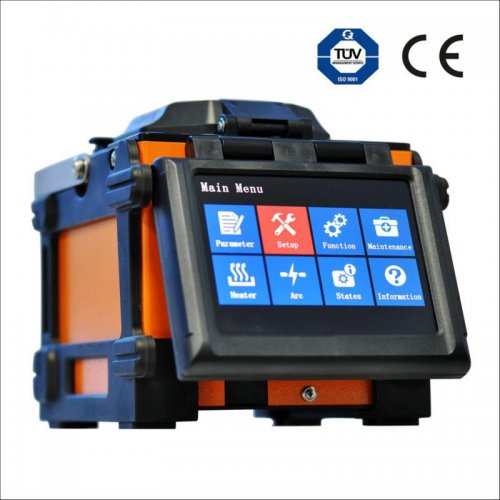
Fusion splicer may be the act of joining two optical fibers end-to-end using heat. The thing is to fuse both the fibers together in such a way that light passing with the fibers is not scattered or reflected back from the splice, and thus the splice as well as the region surrounding it are almost as strong because virgin fiber itself. The basic fusion splicer apparatus includes two fixtures which the fibers are mounted and two electrodes. Inspection microscope assists in the placement in the prepared fiber ends into a fusion-splicing apparatus.The fibers they fit in to the apparatus, aligned, and then fused together.

What is Fusion Splicer?

Fusion splicer may be the act of joining two optical fibers end-to-end using heat. The thing is to fuse both the fibers together in such a way that light passing with the fibers is not scattered or reflected back from the splice, and thus the splice as well as the region surrounding it are almost as strong because virgin fiber itself. The basic fusion splicer apparatus includes two fixtures which the fibers are mounted and two electrodes. Inspection microscope assists in the placement in the prepared fiber ends into a fusion-splicing apparatus.The fibers they fit in to the apparatus, aligned, and then fused together.

Initially, fusion splicing used nichrome wire as the heating unit to melt or fuse fibers together. New fusion-splicing techniques have replaced the nichrome wire with fractional co2 lasers, electric arcs, or gas flames to heat the fiber ends, causing them to fuse together. The little size of the fusion splice along with the development of automated fusion-splicing machines make electric arc fusion the most popular splicing approaches to commercial applications.

Fusion splicers are automatic machines that you need to either choose factory recommended settings or you set the splicing parameters yourself.  There are five basic steps to fusion splicing with a splicing machine.

1.Put on the fusion splice protection sleeve.

2.Strip the fiber. Strip back all fiber coatings down to the 125um bare fiber. Clean the bare fiber with 99% isopropyl alcohol.

3.Cleave the fiber. The fiber needs to be cleaved with a high precision cleaver. Most splicing machines come with a recommended cleaver. Fiber cleaving is a very important step as the quality of the splice will depend on the quality of the cleave.

4.Put the fibers into the fiber holders in the fusion splicer. Press the start button to start the fusion splicing

5.Heat shrink the protection sleeve to protect the splicing joint.

The most common parts of a fiber fusion splicer include Electrodes and V-Grooves. Fusion splicers are dependent upon high-quality electrodes to focus that critical arc of electricity. As the electrodes wear from use, electrodes gradually worn and lead to weaker splices and higher splice losses. Cleaning electrode is part of the essential maintenance of fusion splicer and will not restore the performance of the fusion splicer as electrodes need to be replaced.

Always replace fusion splicer electrodes as a pair. For optimal performance, electrodes should also be aligned when they are replaced. This is a tuning process to maximize the performance of your splicer.

Maintained Methods of Fusion Splicer Parts

1. Electrical welding electrode life is generally about 2000, after a long time the electrode will be oxidized, resulting in the discharge current is too large leaving the splice loss value increases. You can remove the electrodes, medical cotton wool dipped in alcohol to gently wipe and then install the fusion splicer, and discharge cleaned once. If repeated washing, the discharge current is still too large, it shall replace the electrode.

Replace the electrode first remove the protection of the electrode chamber cover, loosen the screws fixed on the electrode and remove the upper electrode. Then release the top wire fixed to the lower electrode, remove the lower electrode. Installation of new electrode opposite action of the demolition order, require two electrode tip clearance: 2.6 ± 0.2mm, with the optical fiber symmetry. Under normal circumstances electrode is not required to be adjusted. Not touch the tip of the electrode in the replacement process, prevent damage, and should avoid the electrodes to fall inside the machine. After replacing the electrode, carry out calibration of the arc position.

Fiber Optic Fusion Spare Electrodes

Care of the electrode used for a long time, the tip of the electrode will produce sediment discharge poor, then there will be a “hissing” sound, then need to clean the electrode. The recommended the regular welding machine electrodes care that clean the electrode.

2. 4 clean V-shaped groove welding machine tune the core direction of the upper and lower driving range each only tens of microns, slightly foreign body will make the fiber image deviation from the normal position, resulting in normal alignment. At this time the need for timely clean the V-groove:

A. Off the windshield of the welding machine.

B. Open the fiber optic pressure head and the clamping platen.

C.Stick with a cotton swab dipped in anhydrous alcohol (or sharpened toothpick) single wipe in a V-Groove Fiber Aligner.

Note: Avoid using hard objects to clean the V-groove or V-groove on the force, to avoid bad V-groove or V-groove inaccurate, resulting in the instrument can’t properly use.

Proper use of Fusion Splicer is to reduce an important guarantee of the optical fiber splice loss and key links. You always should be strictly in accordance with the instructions of the welding machine and operational procedures. And properly set the welding parameters according to the type of fiber (including pre-discharge current, time and the main discharge current, the main discharge time). Do as above, the working life of your fusion splicer certain can be longer.

Conclusion

Despite the advances in fiber and fusion splicing technology, there are still many aspects of splicing of which practitioners must remain aware. Differences in fibers, equipment, environment and technique can yield different splice loss results. It is important to learn how to use and maintain the fusion machine more efficiently.

Here are some guidelines for splicing contractors and technicians.

Follow the applicable equipment manufacturer’s guidelines for setup and maintenance of all splice equipment. All fusion splicer have maintenance requirements which should be described in the operating manual. Besides cleaning regularly, they require electrode alignment and occasional replacement. Follow manufacturer’s requirements for servicing.

Maintain clean equipment and a clean splice environment, being especially wary of windy and/or dusty conditions.

Use the fusion splicer’s estimated splice loss reading as an initial go/no-go evaulation of the splice.

Splice loss specifications should be set with the total link power budget in mind and be based on average splice loss.

For newest quotes of Fusion Splicers, For more info, please browse our website – www.Fiber-Mart.com or by sending an email to product@fiber-mart.com.