
When should i use OM5 Fiber

by http://www.fiber-mart.com

The need to sort through these permutations may partially explain the reportedly low number of OM5 deployments so far. Even cabling suppliers with OM5 in their portfolios note that most 40 and 100 Gigabit Ethernet links are likely to fall within the reach of OM4, making the extended reach of OM5 unnecessary.
For these reasons and others, some cabling suppliers have opted not to add OM5 to their lines. In a blog posted this past April, Gary Bernstein, senior director of product management for fiber and data center solutions at Leviton, described why his company doesn’t support OM5, stating:
The reach advantage of OM5 over OM4 is minimal.
OM5 won’t reduce costs. (OM5 fiber carries a cost premium, and 100-Gbps optics prices are in decline, reasons Bernstein).
It won’t enable higher port densities, since you can’t break out SWDM transmissions into their component parts the way you can with parallel fiber approaches.
A lot of large-scale data centers with a need for 40 or 100 Gigabit Ethernet have or will soon move to single-mode fiber anyway.
This is not to say that the fiber does not have its proponents, particularly for applications that require that extra bit of reach (see, for example, this whitepaper from CommScope). Meanwhile, there is an advantage beyond reach to OM5 and SWDM that could prove useful in future high-speed networks – the ability of one fiber to offer the transmission capacity that currently requires four in conventional use. At 40 or 100 Gbps, that ability could prove helpful when operating in space-constrained environments.
The need to sort through these permutations may partially explain the reportedly low number of OM5 deployments so far. Even cabling suppliers with OM5 in their portfolios note that most 40 and 100 Gigabit Ethernet links are likely to fall within the reach of OM4, making the extended reach of OM5 unnecessary.
For these reasons and others, some cabling suppliers have opted not to add OM5 to their lines. In a blog posted this past April, Gary Bernstein, senior director of product management for fiber and data center solutions at Leviton, described why his company doesn’t support OM5, stating:
The reach advantage of OM5 over OM4 is minimal.
OM5 won’t reduce costs. (OM5 fiber carries a cost premium, and 100-Gbps optics prices are in decline, reasons Bernstein).
It won’t enable higher port densities, since you can’t break out SWDM transmissions into their component parts the way you can with parallel fiber approaches.
A lot of large-scale data centers with a need for 40 or 100 Gigabit Ethernet have or will soon move to single-mode fiber anyway.
This is not to say that the fiber does not have its proponents, particularly for applications that require that extra bit of reach (see, for example, this whitepaper from CommScope). Meanwhile, there is an advantage beyond reach to OM5 and SWDM that could prove useful in future high-speed networks – the ability of one fiber to offer the transmission capacity that currently requires four in conventional use. At 40 or 100 Gbps, that ability could prove helpful when operating in space-constrained environments.

Fujikura 22S cladding alignment fusion splicer

by http://www.fiber-mart.com

AFL has introduced the Fujikura 22S active cladding alignment fusion splicer. With this model’s moveable v-grooves, splicer errors due to dust and other contaminants are virtually eliminated, says the company. Removable sheath clamps allow the use of fiber holders, and the unit’s large monitor provides a crystal clear image, even in bright sunlight.
“Fujikura continues to improve upon fusion splicing technology by incorporating newer features that make splicing easier,” comments Greg Pickeral, product manager for AFL’s fusion splicing systems. “The Fujikura 22S incorporates many of the advanced features of our more expensive models yet retains the quality and reliability they are known for.”
The fully ruggedized Fujikura 22S chassis provides for shock, dust and moisture protection, while the model’s two camera observation system provides for accurate fiber alignment and loss estimation calculations. Additional features include a long-life battery that provides power for up to 200 splice cycles (including the application of the splice sleeve), and an electrode life which has been extended to 5,000 splices, minimizing downtime for replacement and stabilizations. The unit’s transit case and work tray provide multiple options for utilizing workspace.
Ideal for field splicing, the 22S maintains high quality in the most extreme environments. Software updates are available via the Internet allowing users to quickly update their software as new splice programs become available. The Fujikura 22S is also fully compatible with the company’s FUSEConnect line of fusion installable connectors.

What splitter structure you should have in FTTH network centralized or cascading

by http://www.fiber-mart.com

FTTH currently developed very fast in South America and Africa, however, many new comers are curioused about how many splitters should i have in FTTH network.
PON is the basic structure for FTTH network, PON is short for Passive Optical Network. It consists of OLT, ODN (Splitter) and ONT. From the structure, splitter placement in ODN is very crucial. there are generally two types of splitter placement in ODN network, centralized splitting and cascading splitting. The centralized splitter uses single-stage splitter located in a central office in a star topology. The cascading splitter approach uses multi-layer splitters in a point to multi point topology.
The centrlized splitting structure generally uses a 1×32 splitters in the central office. . The central office CO may be located anywhere in the network. The splitter input port is directly connected via a single fiber to a GPON/GEPON optical line terminal (OLT) in the central office. On the other side of the splitter, 32 fibers are routed through distribution panels, splice ports and/or access point connectors to 32 customers’ homes, where it is connected to an optical network terminal (ONT). Thus, the PON network connects one OLT port to 32 ONTs.
A cascading splitting structure approach may use a 1×4/1×8 splitter residing in an outside plant enclosure/terminal box. This is directly connected to an OLT port in the central office. Each of the four fibers leaving this stage 1 splitter is routed to an access terminal that houses a 1×8/1×4, stage 2 splitter. In this scenario, there would be a total of 32 fibers (4×8) reaching 32 homes. It is possible to have more than two splitting stages in a cascaded system, and the overall split ratio may vary (1×16 = 4 x 4,  1×32 = 4 x 8, 1×64 = 4 x 16, 1×64 = 8 x 8).
A centralized architecture typically offers greater flexibility, lower operational costs and easier access for technicians. A cascaded approach may yield a faster return-on-investment with lower first-in and fiber costs. When deciding on the best approach, it’s important to understand these architectures in detail and weigh the trade-offs. The cascading type of splitting is the most commonly used in the FTTH ODN structures.

Comparing Passive Optical Networks and Passive Optical LANs

by http://www.fiber-mart.com

The Basics of Passive Optical Networks (PONs)
A PON is a point-to-multipoint network using optical splitters and loose tube singlemode fiber for outdoor network deployments.
Passive optical network technology has been around for a long time. Outside plant carrier networks (fiber-to-the-home, or FTTH) providers have been using passive optical network technology for over a decade.
PONs work well because their providers have lots of experience with passive optical networks; they know how much bandwidth a customer (one home, or one dwelling unit) typically consumes, so they can set up their split ratios very efficiently. There is a demonstrated blueprint for where to locate splitters, and what ratios are needed. This has been developed through trial and error over time.
The Basics of Passive Optical LANs
A traditional LAN manages signal distribution with numerous routers and switch aggregators. Passive optical LANs use passive optical splitters, just like PONs, but are adapted to indoor network architectures. As an alternative to traditional LAN, passive optical LAN is also a point-to-multipoint network that sends its signals on a strand of singlemode fiber. POLAN (or POL) utilizes the optical splitters to divide the high bandwidth signal for multiple users, and makes use of wavelength division multiplexing (WDM) technology to allow for bi-directional upstream and downstream communication. A passive optical LAN consists of an optical line terminal (OLT) in the main equipment room and optical network terminals (ONTs) located near end-users.
Because of this setup, passive optical LAN can decrease the amount of cable and equipment required to deploy a network. Compared to traditional copper cabling systems and active optical systems, passive optical LAN streamlines the amount of cabling required within a network. Also, because the splitters are passive (requiring no power and emitting no heat), the power and cooling requirements for traditional intermediate distribution frames (IDFs) or telecommunications rooms (TRs) is drastically reduced or eliminated.
Passive Optical LAN Offers Many Benefits
The waters are a bit uncharted when it comes to passive optical LAN, however – especially compared to outdoor PON. As of right now, there are no established POLAN standards; each vendor works from its own platform (ONTs from one vendor are not compatible with the OLTs of another, for example). Also, there is a much shorter history for POLAN deployments; split ratios are generally not as well understood (how much bandwidth does your engineering department really need?). In the past, passive optical LAN deployments were also completed without following a structured approach, so they often lacked interconnection points for future moves, adds and changes (MACs) and repairs.

How Multiplexing Techniques Enable Higher Speeds on Fiber Optic Cabling

by http://www.fiber-mart.com

Different multiplexing technologies are enabling the evolution of network speeds on fiber optic cabling. Such technologies include time division, space division and wavelength division multiplexing.
Wavelength Division Multiplexing
Wavelength division multiplexing is signaling simultaneously across multiple lanes segregated by different wavelengths (colors) of light that are multiplexed into and out of a single fiber. As the name implies, the wavelength band available for transmission is divided into segments each of which can be used as a channel for communication. It is possible to squeeze many channels into a small spectrum. The common versions used for long haul, single mode systems are called dense wave division multiplexing or coarse wave division multiplexing. In multimode systems, short wavelength division multiplexing techniques are appearing.
Space Division Multiplexing
Space division multiplexing, more commonly known as parallel optics or parallel fibers, is a way of adding one or more lanes simply by adding one or more optical fibers into the composite link. A lane in this scenario is physically another fiber strand. It’s an alternative to time division multiplexing lanes described above, where signals merged each in time on the same fiber. There are a number of examples of this technique being used in the industry. For example, 40G SR4 delivers 40Gbps over multi-mode fiber using four lanes or fibers. That’s four lanes in one direction and four lanes in the other direction. That’s also what the four on the end of ‘SR4’ means, four lanes of 10Gbps each.
Time Division Multiplexing
Time division multiplexing is simply a way of transmitting more data by using smaller and smaller increments of time, and multiplexing lower data rate signals into a higher speed composite signal. With time division multiplexing, lower speed electrical signals are interleaved in time and transmitted out on a faster composite lane. So, the higher resultant data rate would be multiple times the individual rates going in.
There are examples used today where Ethernet rates are achieved using such parallel electrical signals, combined in a multiplexer and serialized over fiber. For instance, 10Gbps Ethernet has four lane options where each of the lanes is at a quarter rate of 2.5Gbps.
Today’s top speed per lane is 25Gbps for Ethernet. If we look into the future, 50Gbps lane rates are being developed.
With the higher rates, more complex multi-level code schemes are used to get more bits through with each symbol. This is an indication that maximum speed limits are being reached and so alternative techniques are used to increase the composite lane speed.
Space Division Multiplexing
The standard for the 100Gbps solution uses 10 lanes of 10Gbps called SR10. There is also a second generation of 100G that has increased the lane rate to 25Gbps and that delivers 100G using four lanes, so mixing the improvements in time division multiplexing and parallel optic techniques to achieve the goal of higher speeds.
Taking this further from four lanes in each direction up to 16 or 24 lanes, speeds of 200Gbps, 400Gbps and beyond are made possible; however there are pragmatic limits. If you can get away with it, then clearly a four lane solution is more practical than a 24 lane solution. Going above 16 or 24 lanes is a diminishing return because it drives more cost into the cabling system. That’s where the third multiplexing technique, wave division multiplexing, comes in.
With short wavelength division multiplexing, wavelengths are used in the lower cost short wavelength range around 850nm to add lanes within a single strand of optical fiber. An example of this on the market today is Cisco’s 40G BD, or Bi-Di. Bi-Di stands for bidirectional and the signals are transmitting in both directions in each optical fiber strand, using two different wavelengths to discriminate between the reflections that might happen. This technique uses 20Gbps per wavelength in each of two fibers and that way they can get 40Gbps through the 2 core fiber channel using a duplex LC connector.
for more details about optical fiber cables, pls visit http://www.fiber-mart.com

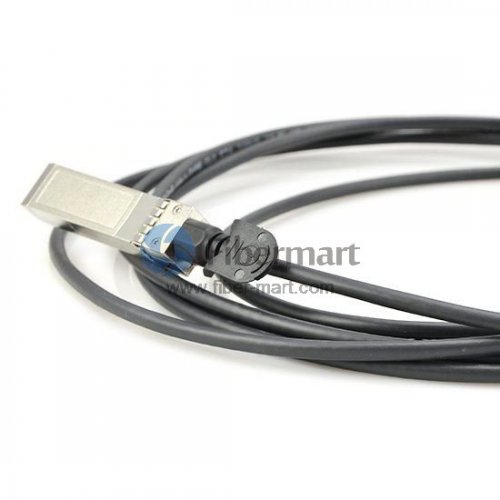
What is SFP+ Direct Attach Copper Cable(DAC)?

In today’s market, Direct Attach Cables (DAC)provide an excellent pre-terminated and factory assembled & tested solution for both copper and fiber optic cabling in data centers.


In today’s market, Direct Attach Cables (DAC)provide an excellent pre-terminated and factory assembled & tested solution for both copper and fiber optic cabling in data centers. It is a kind of optical transceiver assembly widely applied in storage area network, data center, and high-performance computing connectivity etc. The DAC cables are used to connect one mobility access switch with another when forming a stack.


Direct-Attach Cables (DAC) are cost efficient close-range interconnection media widely used in telecom operator equipment rooms, data centers and corporate networks for connecting LAN and SAN equipment in same or neighboring racks. Our multi-vendor compatible Direct-Attach Cables portfolio support full range of transmission speeds from 10 Gbps up to 100 Gbps applications, customizable length of cables and current most popular interface assembly form factors – QSFP and SFP. Our multi-vendor compatible Direct-Attach Cables portfolio is compatible with 80% of networking equipment, where is not implemented a special algorithm for protection against third party modules. However – we can provide Direct-Attach Cables with custom-encoded firmware in order to make it work almost in any equipment and we can support encoding of each end to support different vendor equipment, allowing using Direct-Attach Cables as cross-platform interconnection medium.


SFP+ direct attach cable (DAC) is a fixed assembly that is purchased at a given length, with the SFP+ connector modules permanently attached to each end of the cable. SFP+ DAC provides high performance in 10 Gigabit Ethernet network applications, using an enhanced SFP+ connector to send 10 Gbps data through one paired transmitters and receivers over a thin twinax cable or fiber optic cable. The 10G SFP+ Cable is designed to use the same port as an optical transceiver, but compared with optical transceivers, the connector modules attached to the cable leave out the expensive optical lasers and other electronic components, thus achieving significant cost savings and power savings in short reach applications.


SFP+ DAC is a low cost alternative to traditional fiber and twisted-pair copper cabling in data center deployments. SFP+ DAC provides better cable management for high-density deployments and enhanced electrical characteristics for the most reliable signal transmission

DDAC

Passive and Active 10G SFP+ Direct Attach Cable (DAC)

SFP+ Direct Attach is known as the successor technology to 10GBASE-CX4. SFP+ Direct Attach, as implied in the name, uses SFP+ MSA and by using the inexpensive copper twinaxial cable with SFP+ connectors on both sides, provides 10 Gigabit Ethernet connectivity between devices with SFP+ interfaces. SFP+ Direct Attach has a 10 meter distance limitation, thus the target application is interconnection of top-of-rack switches with application servers and storage devices in a rack.

Passive cables are much less expensive but require the host to do the work of driving it properly.

Benefits:

  • Lower Costs
  • Higher Reliability
  • Lower Power Consumption
  • Plug and Play Simplicity

Fewer Components (No Active Tx /Rx Components)

Only Capacitors, Resistors, EEPROM, Cable


Tradeoffs:

  • Reduced Cable Flexibility
  • Reduced Modularity
  • Limited Distance
  • No LOS
  • No TX Disable
  • No Interrupts
  • Limited Management Interface
  • Host must drive Cu cable


Active cables offer the benefit of optical-module.

Benefits:

  • Enhanced Signal Integrity
  • Longer Cable Lengths
  • Transmit Pre-emphasis
  • Active/Adaptive Receive Equalization
  • Tx Disable
  • Loss of Signal (LOS)
  • Interrupts
  • Management Interface


Tradeoffs:

  • Higher price


Fiber-Mart supplies various kinds of high speed interconnect DAC cable assemblies. All of our direct attach cables can meet the ever growing need to cost-effectively deliver more bandwidth, and can be customized to meet different requirements. For more information, pls visit www.fibermart.com. pls not hesitate to contact us for any question:service@fiber-mart.com