Why Do I Need an OTDR?

by http://www.fiber-mart.com

(OTDR) is an optoelectronic instrument used to characterize an optical fiber. An OTDR is the optical equivalent of an electronic time domain reflectometer. It injects a series of optical pulses into the fiber under test and extracts, from the same end of the fiber, light that is scattered (Rayleigh backscatter) or reflected back from points along the fiber. The scattered or reflected light that is gathered back is used to characterize the optical fiber. This is equivalent to the way that an electronic time-domain meter measures reflections caused by changes in the impedance of the cable under test. The strength of the return pulses is measured and integrated as a function of time, and plotted as a function of fiber length.
Fiber testing is essential to provide confidence that the network is optimized to deliver reliable and robust services without fault.
Outside Plants
Telecom, video, and data wireless service providers and network operators want to insure that their investments into fiber networks are protected. In outside fiber optic plant, every cable will be tested for end-to-end loss and with an OTDR to ensure the installation was properly made. Installers will be asked to use loss test sets (source and power meters) as well as OTDRs, performing bi-directional tests and providing accurate cable documentation to certify their work. Later, OTDRs can be used for troubleshooting problems such as break locations due to dig-ups.
Premises, LAN/WAN, Data Centers, Enterprise
Many contractors and network owners question whether they should perform OTDR testing for premises cabling. They also want to know if OTDR testing could replace the traditional loss testing with a power meter and a light source. Premises fiber networks have tight loss budgets and less room for error. Installers should test the overall loss budget with a light source and power meter (Tier 1 certification required by TIA-568C standards). OTDR testing (Tier 2 certification) is a best practice that can pinpoint the causes for excess loss and verify that splices and connections are within appropriate tolerances. It is also the only way to know the exact location of a fault or a break. Testing a fiber link with an OTDR also helps document the system for future verification.

How to Clean and Connecting Optical Fibers to OTDR

by http://www.fiber-mart.com

If your fiber optic cable is not properly aligned and/or connected, you will notice heavy loss and reflection. Properly cleaning and connecting optical fibers to OTDR is important, please follow the following steps to clean the fibers and connecting it to OTDR.
To connect the fiber optic cable to the port:
1. Inspect the fiber using a fiber inspection microscope. If the fiber is clean, proceed to connecting it to the port. If the fiber is dirty, clean it as explained below.
2. Clean the fiber ends as follows:
2a. Gently wipe the fiber end with a lint-free swab dipped in isopropyl alcohol.
2b. Use compressed air to dry completely.
2c. Visually inspect the fiber end to ensure its cleanliness.
3. Carefully align the connector and port to prevent the fiber end from touching the outside of the port or rubbing against other surfaces. If your connector features a key, ensure that it is fully fitted into the port’s corresponding notch.
4. Push the connector in so that the fiber-optic cable is firmly in place, thus ensuring adequate contact.
If your connector features a screwsleeve, tighten the connector enough to firmly maintain the fiber in place. Do not overtighten, as this will damage the fiber and the port.
Note:
Always inspect fiber ends and make sure that they are clean as explained below before inserting them into the port. Most OTDR suppliers are not responsible for damage or errors caused by bad fiber cleaning or handling.
Ensure that your fiber optic patch cord has appropriate connectors. Joining mismatched connectors will damage the ferrules.
To keep connectors clean and in good condition, We strongly recommends inspecting them with a fiber inspection probe before connecting them. Failure to do so will result in permanent damage to the connectors and degradation in measurements.

OTDR FAQ, for all kinds of OTDR

by http://www.fiber-mart.com

 OTDR is short for Optical Time Domain Reflectormeter, The OTDR act likes RADAR, it injects a series pulse (laser) from the OTDR fiber interface and transmits over the optical fiber and detects the returning signal from the fiber back-scatter and reflecting from joints (including splicing, active connecting, etc), Based on the return signal, the OTDR generates trace and display on the screen. From the trace, the OTDR device is able to calculate fiber length, attenuation and joint loss for the optical fiber.
What is the basic function for the OTDR?
Measure the length for the optical fiber
Measure the optical fiber distance between two sites
Locate fault points and ruptures of the optical fiber
Showing the trace for the optical fiber
Measure the attenuation for the optical fiber cable
Measure the refection of the reflection events for the fiber cable
2>. What’s the basic feature that an OTDR should have?
There is distance, loss and reflection figure for each event
It should display the length and attenuation for the whole fiber cable
Large storage function for traces
Easy operation and with GUI interface.
RS232/USB/Network etc to upload data to a PC
PC analysis software to analyzing the stored data
Generate report for the tested traces
Back light for dark and night operation
Built-in VFL (Visual Fault Locator)
3>. How to select an OTDR?
Before you buy the OTDR, please evaluate your needs and the skill of the intended users first, ask yourself several questions:
Are you installing or maintaining fiber?
If Maintenance, is finding the location of the fault the main task?
If Installation, do you need measure more than loss and length? E.g. Connector quality, dispersion, Optical Return Loss?
If you get the answer, please visit link for more details about choose the right OTDR: How to choose the right OTDR?
4>. How many OTDR manufacturers in the market?
There are many manufactures like EXFO, JDSU, Fluke, FIBER-MART, Yokogawa, Anritsu, etc.
5>. What is the dynamic range
The dynamic range determines the total optical loss that the OTDR can analyze, and the total length of the fiber link can measure unit. The higher the dynamic range, the greater the distance the OTDR can analyze. The specification of the dynamic range must be carefully considered for two reasons as below.
OTDR manufacturers specify the dynamic range of ways (playing with specifications as pulse amplitude, signal-to-noise ratio, averaging time, etc.). It is therefore important to understand them thoroughly and avoid making comparisons unsuitable.
Having an insufficient dynamic range results in an inability to measure the full link length, affecting, in many cases, the precision of the link loss and connector losses and attenuation far end . A good method is to select an OTDR empirical whose dynamic range is 5 to 8dB higher than the maximum loss you will find.
6>. What is Event dead zone and attenuation dead zone
Event Dead Zone: Refers to the minimum necessary for consecutive reflection events can be “solved”, ie differentiated from each other. If a reflective event is within the dead zone event that precedes it, it cannot be detected or measured correctly. Industry standard values ranging from 1-5 m for this specification.
Attenuation Dead Zone: Refers to the minimum required distance after a reflective event, for the OTDR to measure a loss of reflective event or reflection. To measure and characterize small links or locate faults in cables and patch cords, it is best to have the attenuation dead zone as small as possible. Industry standard values ranging from 3 to 10 m for this specification.
7>. What is the pulse, and how to choose pulse width based on the fiber length
The key is to always use the shortest pulse width possible that will satisfy the trace quality and allow the user to see the end of the fiber. Short pulse widths are used for short fibers. Long PW’s are used on long fibers. If the trace quality exhibits excessive noise that cannot be removed by additional averages, select the next higher pulse width.
8>. What is OTDR resolution
The sampling resolution is defined as the minimum distance between two consecutive sampling points acquired by the instrument. This parameter is important because it defines the ultimate distance accuracy and ability OTDR troubleshooting. Depending on the selected pulse amplitude and the range of distance.
9>. Can I use SM OTDR to test MM fiber
It may use SM (Single Mode) OTDR to test MM (Multimode) fiber, but not accurate, the distance, cable loss, connector loss, return loss all may not right, because the laser inject from small core diameter fiber to large core diameter fiber, the laser cannot be fully injected, so the test result is not precise.
10>. What is OTDR Launch Cable, why do I need it.
An OTDR Launch Cable is able to allow the OTDR to measure the loss and reflection of the first connection in the link. However, it won’t eliminate the ‘dead zone’ after the first connection in the fiber link. We generally recommend 1km launch cable for the fiber network.
11>. What is tail cord and why do I need it.
A tail cord is a long distance patch cord connect to the end of the tested fiber link, it creates OTDR back scatter after the final connection in the fiber link under test, to measure the loss and reflection for the last connection in the network
12>. What is an “echo” or “ghost” event on an OTDR trace
An echo occurs when the OTDR receives unwanted multiple reflections. Large reflective events are more likely to cause multiple reflections due to large amounts of energy reflected back to the OTDR. Portions of the energy reflected multiple times result in echoes. These waveform artifacts look like real events; however they seldom have loss associated with them.
Please Share this OTDR FAQ to let more people could enjoy it. and please also drop message to me if there is any mistake, we share update this OTDR FAQ webpage as soon as possible.

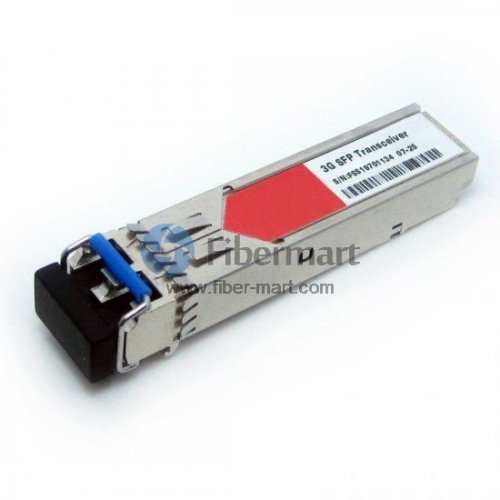
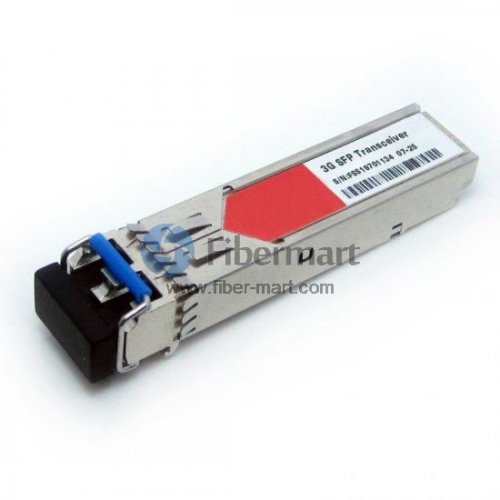
How to choose 3G Digital Video SFP ?

In fiber optic network industry,  Digital video SFP is responsible for transmitting HD or higher standard video.


In fiber optic network industry,  Digital video SFP is responsible for transmitting HD or higher standard video, so there are 3G digital video SFPs suitable for SD/HD/3G-SDI. and so more and more people are interested in SFP modules.


What is SDI?


Digital Video SFP is a 3G-SDI standard optical transceiver designed to transmit SDI, HD-SDI, or DVB digital video signals over fiber. It is a dual channel optical transmitter module which transmits optical serial digital signals that defined in SMPTE 297-2006.

3G.jpg
Digital Video 3G Transmitter CWDM

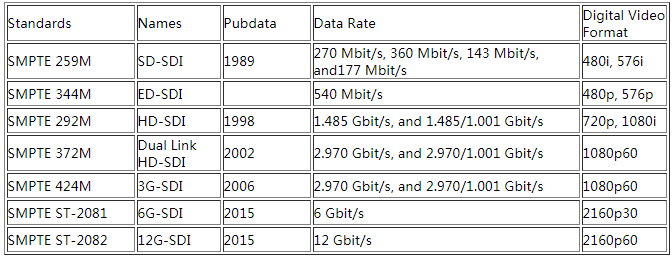
Fiber Optic Transport of HD/SD-SDI It is becoming increasingly necessary and economically feasible to transport HD/SD-SDI signals over fiber instead of coaxial cable. SDI, the abbreviation for Serial Digital Interface, is a digital video interface standard made by SMPTE organization. This serial interface transmits every bit of data word and corresponding data through single channel. Due to the high data rate of serial digital signal(a kind of digital baseband signal), it must be processed before transmission.Additional SDI standards include HD-SDI, 3G-SDI, 6G-SDI, and 12G-SDI. HD-SDI was standardized by SMPTE 372M in 1998. It can support 1.485Gbps interface. 3G-SDI consists of a single 2.970Gbps serial link that allows replacing dual link HD-SDI.


3G Digital Video SFPs Types


3G digital video SFPs include 3G SDI SFP, BiDi SFP and CWDM SFP. According to different standards, it can be divided into different types. Based on the transmission mode, it can be divided into single Tx, single Rx, dual Tx, dual Rx and TR transceivers; by standards into MSA and non-MSA; by operating wavelength into 1310nm, 1490nm, 1550nm and CWDM wave length.It also exists video modules of electrical interfaces that adapting mini BNC port to coordinate with SFP slot-supporting digital matrix. Currently there are also on the market some crossover video transceivers, for example, transfer the encoded SG-SDI to IP protocol conversion module can be used in traditional Ethernet switch, replacing video codec equipment. 3G digital video SFPs also have 3G video SFP and 3G video pathological patterns due to different applications.the data rate of digital SDI as below.


图片1.png


Now we say that what are 3G-SDI pathological patterns? Pathological patterns, also called SDI proving ground, are a whole test signal. And it must be done during blackout. This signal is tough to handle by serial digital system, and significant to check the system performance. Pathological patterns often contain the richest low-frequency energy which statistically happens one per frame. Pathological patterns test is also an important indicator of video SFP modules.  Fiber-Mart provides a series of 3G-SDI SFP modules to support transmission rates from 50 Mbps to 3 Gbps. These digital video modules are specifically designed for SMPTE SDI pathological patterns, allowing hot-plug capability with the 20-pin SFP connectors.


According to this article, i believe you have known some knowledges about 3G Digital Video SFP. Fiber-MART can  provide you custom service and  a series of 3G-SDI SFP modules to support transmission rates from 50 Mbps to 3 Gbps. Any question pls not hesitate to contact us.E-mail:service@fiber-mart.com

Five things you should know before your next installation

by http://www.fiber-mart.com

There are five things you should know before your next installation in order to avoid potential network failure and reduce your risk of costly mistakes.
1 Know your contractor
2 Increase error-free work with trained technicians
3 Ensure a quality installation with quality fiber optic products
4 Require a 25-year warranty for additional network protection and coverage
5 Request system testing results to ensure cabling system is properly functioning
Know your contractor
fiber optic installation is only as good as the products and the contractor you select. By choosing a reputable manufacturer such as Corning Cable Systems, half the battle is eliminated. However, choosing an installer for your thnext project can be time consuming and even frustrating at times. Utilizing the Network of Preferred Installers gives you reassurance that your installer is a handpicked, first-rate choice. Our by-invitation-only network means less financial risk of expensive mistakes and a higher probability of your complete satisfaction.
Increase error-free work with trained technicians
The bulk of improper installations are due to untrained or uncertified technicians. By making certain your contractor’s company has received proper hands-on training, you reduce the possibility of onsite cabling errors. All Preferred Installers within our network have received training on Local Area Network (LAN) design and hands-on product training. Because all training requirements must be renewed every two years, this means your installer is up-to-date on current installation methods, testing procedures, and product knowledge.
Ensure a quality installation with quality fiber optic products
The amount of information carried in two strands of optical fiber would require a copper cable four inches in diameter. When considering the space constraints, required bandwidth, and long distance transmission needs in today’s applications, fiber optic products are the only viable choice. Easy installation and upgrades allow you to meet future growth needs and install spare fiber today for a more economical choice than installing additional cables later. Corning Cable Systems LANscape® Solutions gives you quality products for all your fiber optic needs to reduce your risk of network failure.
Require a 25-year warranty for additional network protection and coverage
An extended warranty helps protect you from unexpected repair bills and provides the peace of mind that comes along with the Corning Cable Systems 25-year guarantee on its LANscape Solutions. Our warranty is simple. If a component fails, we replace it – no questions asked. By taking advantage of this additional coverage, your network is ensured to continue operating at its highest performance.
Request system testing results to ensure cabling system is properly functioning
Fiber optic testing of newly installed systems not only verifies that the system meets its design requirements, but also creates a performance baseline for all future testing and troubleshooting of that system to support the evaluation of warranty claims, should they ever arise. Corning Cable Systems requires that all fiber optic systems installed by members of the Network of Preferred Installers be tested to a minimum set of standards. This testing will ensure that the data necessary to properly evaluate any future system malfunctions will be available. The result will be better and faster service to you. Furthermore, by requiring a copy of your system’s bill-of-materials and design documents, we are able to quickly process potential claims to get your network back up and running once more.

MPO/MTP Trunk Cable Advantages

by http://www.fiber-mart.com

A specific lengths pre-assembled MTP/MPO Trunk cable with 12 or 24 fibers is delivered to data center for easy installation, because an It is impossible to manually to assemble MPO/MTP plug connector with 12 or 24 fibers on site during installation.
The advantages of MPO/MTP Trunk cable with the following advantages
• Higher Quality
Higher quality is usually achieved through factory assembly and inspection of individual parts. A factory-prepared inspection certificate is also useful for longterm documentation and in turn quality assurance purposes.
• Minimum Skew
A crucial factor in achieving a successful parallel optical connection is keeping the signal offset (skew) between the four or ten parallel fibers to an absolute minimum. Only in this way can information be successfully re-synchronized and re-combined at its destination. Factory-assembled trunk cables allow skew to be measured, minimized and logged.
• Shorter Installation Times
Pre-assembled MPO cable systems provide plug-and-play advantages and can be inserted and set up immediately.
This reduces installation time enormously
• Better Protection
Because they are completely assembled at the factory, cables and plug connectors remain completely protected from
environmental influences. Optical fibers that lie open in splice trays are at a minimum exposed to ambient air and may age faster as a result.
• Smaller Cable Volumes
Smaller diameters can be realized in MPO cabling systems that are produced from loose tube cables. The results are
correspondingly smaller cable volumes, better conditions for acclimatization in the data center and a lower fire load.
• Lower Overall Costs
When splice solutions are used, a few factors that are not always foreseeable boost total costs: time-intensive,
equipment-intensive splicing, needs for specialty works, bulk cables, pigtails, splice trays, splicing protection, holders. In contrast, pre-assembled trunk cables not only bring technical advantages, but usually result in lower total costs than splicing solutions.