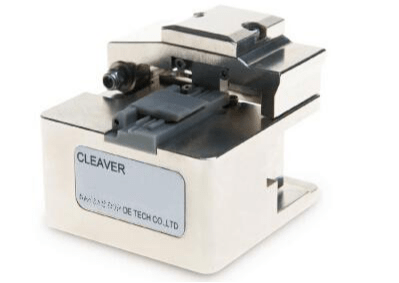
Introduction of Fiber Optic Cleaving

As we know, in most cases, when a fiber is used or spliced, it is essential to prepare clean ends. Stripping, cleaving, polishing are the basic steps to ensure fiber ends clean and smooth. Cleaving, an essential step of making fiber ends clean, though it’s a simple mean, but it works surprisingly well, at least for standard glass fibers. Thus, I want to share something about the cleaving in this paper today.

As we know, in most cases, when a fiber is used or spliced, it is essential to prepare clean ends. Stripping, cleaving, polishing are the basic steps to ensure fiber ends clean and smooth. Cleaving, an essential step of making fiber ends clean, though it’s a simple mean, but it works surprisingly well, at least for standard glass fibers. Thus, I want to share something about the cleaving in this paper today.

图片1

Basics of Fiber Optic Cleaving

Fiber optic cleaving is one of the several processes in the preparation for a fiber splice operation. The purpose of cleaving is to prepare the end of the fiber so that it makes a very nearly perfect right angle with the body of the fiber and that this end face is nearly perfectly smooth. With a well-performed cleaving operation, a clean and flat endface was created perpendicular to the length of the fiber, with no protruding glass on either end. Besides it can also help to achieve a successful low loss splice of an optical fiber.


The technique of Fiber Optic Cleaving

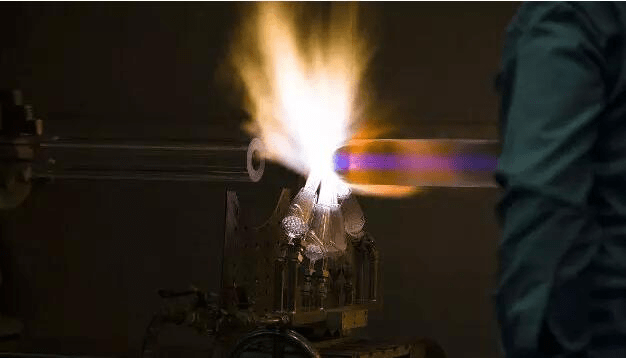
A general strategy involved in the technique of fiber optic cleaving is known as the scribe-and-tension or scribe-and-break strategy. With the use of cutting tool made from materials such as diamond, sapphire or tungsten carbide, this process involves the introduction of a crack in the fiber, then followed by the application of tensile stress in the vicinity of the crack.

However, the specific implementations of the cleaving can be various thus lead to cleaves of different qualities. Some implementations may apply the tensile force uniformly across the cross section of the fiber while others might bend the fiber around a curved surface, causing excessive tensile stress on the outside of the bend. Besides, the crack in the fiber may also be generated in different ways: the crack may be introduced at a single point on the circumference or it may be generated all along the circumference of the fiber prior to the application of the tensile force. The circumferential introduction of the crack often allows fibers of considerably large diameters to be cleaved while maintaining high quality of the cleave.
图片2

Two Types of Fiber Optic Cleavers

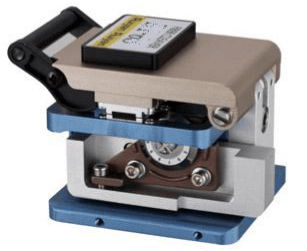
As mentioned before, fiber optic cleavers can be classified into precision cleavers and cheap or scribe cleavers.

Scribe Cleavers—The scribe or manual cleaver, which is cheaper than the precision cleaver, is the most original type of fiber optic cleaver. Scribe cleavers are usually shaped like ballpoint pens with diamond tipped wedges or come in the form of tile squares. The scribe has a hard and sharp tip, generally made of carbide or diamond, to scratch the fiber manually. Then the operator pulls the fiber to break it. Since the breaking process is under manual control, it is hard to control the force, which makes the cleaving less accurate and precise. That’s why most technicians shy away from these cheap cleavers.

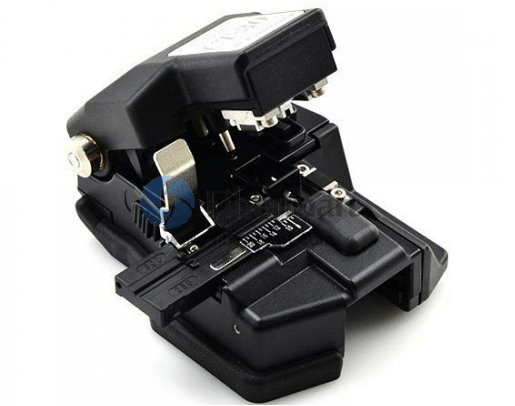
Precision Cleavers—As the name implies, precision cleavers can do a preciser cleaving job compared to the scribe cleavers. A precision cleaver uses a diamond or tungsten wheel/blade to provide the nick in the fiber. Tension is then applied to the fiber to create the cleaved end face. The advantage of the precision cleavers is that they can produce repeatable results through thousands of cleaves by simply just rotating the wheel/blade accordingly. Although they are more costly than scribe cleavers, precision cleavers can cut multiple fibers with increasing speed, efficiency, and accuracy. As the fusion splicers became popular, precision cleavers were developed to support various splicing works. Precision cleavers are deal for fusion splicing standard 125/250um & 125/900um fibers and preparing fiber for various pre-polished connectors.
3

Operation Procedure for Fiber Cleavers

A fiber cleaver utilizes an automatic anvil drop for fewer required steps and better cleaving consistency. The automated anvil design can save time and significantly improve the quality of the cleave by eliminating human error and subpar cleaves associated with scribes and manual cleavers. To perfectly cleave optical fibers, perform the following steps:

Step 1: Open the body cover and put the stripped fiber on the v-groove.

Step 2: Close the holder cover.

Step 3: Close the cover and move the slider forward to cleave the fiber.

Step 4: Open the cover and check the cleaved fiber.

Step 5: Open the holder cover and take out the cleaved fiber.

Step 6: Remove the chip of cleaved fiber with a pair of tweezers.

6

Tips on Choosing Fiber Cleavers

1.Select fiber cleavers according to your application requirements. Fiber cleavers, designed for fusion splicing, need a low average angle that is one degree or less, whereas cleavers appropriate for mechanical connectors require angles below three degrees. So determine whether you require a single-fiber or multi-fiber cleaver before you cleave the fibers at one time.

2.Think twice before purchasing a cleaver built into a splicer. If you intend to purchase the built-in cleavers, you must check whether the cleaver or splicer requires maintenance. It may cause inconvenience to technician if they loses valuable tools, which can hold up the job at hand.

3.Purchase a cleaver with the latest automation features that can save a lot of labour and time. Fiber cleavers are always continuing to evolve with new and improved features, such as automated fiber scrap collection, automated scoring mechanisms, and the latest automatic blade rotation technology.


Conclusion

To get good fiber optic splices or terminations, especially when using the pre-polished connectors with internal splices, it is extremely important to cleave the fiber properly. As we know, fiber splicing requires mating two fiber ends. Any defect of the ends would impact the performance of fiber splicing.To buy reliable and high precision fiber cleavers, please visit www.fiber-mart.com or contact us product@fiber-mart.com.


Introduction of Loopback Cable and How do we Create it?

A loopback cable is also known as loopback plug or loopback adapter, which is a plug used to test physical ports to identify network issue. It provides system test engineers a simple but effective way of testing the transmission capability and receiver sensitivity of network equipment.

In our day to day jobs we find ourselves lugging around more and more hardware; pda, laptop, cell phone, and sometimes even hubs. Why do we carry a hub around when sometimes all we need is a link on our ethernet cards so that all the applications on the system work. Yes, I know you could setup a loopback software adapter. But if you are looking to have the system configured as close to the real setup as possible and you don’t want to carry a hub around, just to get a link light on your NIC. Consider building yourself a loopback cable.

rt

What Is Loopback Cable?

A loopback cable is also known as loopback plug or loopback adapter, which is a plug used to test physical ports to identify network issue. It provides system test engineers a simple but effective way of testing the transmission capability and receiver sensitivity of network equipment. In a word, it is a connection device that is plugged into a port to perform a loopback test. There are loopback plugs for many different ports, including serial ports, Ethernet ports, and WAN connections.

Fiber-Loopback-2

Loopback Cable Type

Fiber Loopback Cable

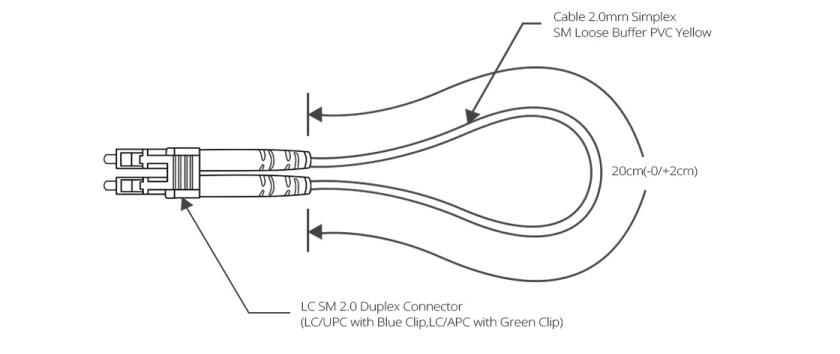
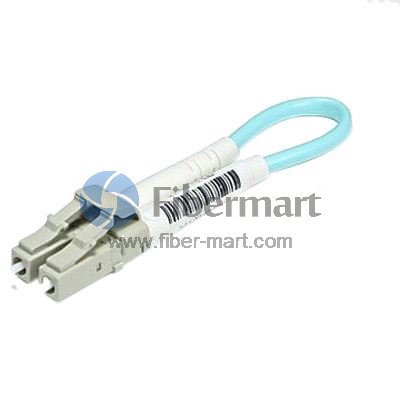
Fiber optic loopback incorprates two fiber optic connectors which are plugged into the output and input port of the equipment respectively. Therefore, fiber loopback cables can be classified by the connector types, such as LC, SC, FC, MTRJ. These fiber optic loopback plug connectors are compliant to IEC, TIA/EIA, NTT and JIS specifications. Besides, fiber optic loopback cables also can be divided into single mode and multimode fiber loopback. To describe this item clearly, I will take LC fiber optic loopback cable as an example, which is one of the most popular cables (as shown in the following figure). The LC fiber optic loopback cables support the test of transceivers featuring LC interface. They can comply with the RJ-45 style interface with low insertion loss, low back reflection and high precision alignment. LC loopback cables can be 9/125 single mode, 50/125 multimode or 62.5/125 multimode fiber type.

ytr

RJ45 Loopback Cable

A Gigabit RJ45 loopback cable is an exceedingly user friendly cable tester. It looks like a simple plug at first glance, but the compact and rugged design makes it highly portable and usable in the tightest corners. All you have to do is to simply plug the Gigabit RJ45 loopback into the jack that you want to test or the one you are suspicious about. If the link LED on your switch is active, it means that the connection is operating perfectly. The RJ45 loopback cable will negate the necessity to carry a bulky network hub around.

sc

How to build the loopback cable simplified?

If you are handy with building ethernet cables, the simple explanation is;

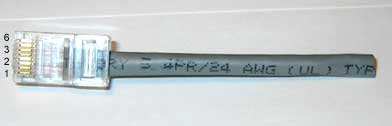
  1. Redirect Pin 1 to Pin 3 and Pin 2 to Pin 6.
  2. Make sure you create tight twists to account for signal interference at such a short length.

4

How to build a loopback cable illustrated?

Step 1. Get a pair of approximately 4 inches in length of cat 5 cable.

Step 2. Leave approximately 1/2 inch at end and start twisting, very tightly.

Note: If your fingers start to hurt, you may want to use a tool to help with the twisting. Notice how tightly wound the cable is. If the twists are not close enough the loopback will not work. Please twist to match picture.

Step 3. After twisting is done, fold cable and line up the ends. Cut if you must to line up cables. Line up the cables so that the cables are in the proper alignment to prepare for insertion into RJ-45 end.

 Step 4: Insert cable into RJ-45 end. (do not crimp yet.) Remember, 1236 pins.

Step 5. Insert plastic tubing over the wire and into the RJ-45 end. Now crimp the end with a crimping tool.

Note: When you first plug in the loopback cable, wait approximately 10 seconds to get a link light. No more carrying around a hub just to get a link light.

5

Conclusion

All in all, If we know what a is loopback cables and know how to create loopback cables, it will bring many benefits to our work and life.loopback cables play an important role in troubleshooting in laboratories and manufacturing environments. They facilitate the testing of simple networking issues and are available at very low costs. There are many loopback cable manufactures on the market, providing single mode and multimode fiber optic loopback plugs available with FC, LC, MT-RJ, SC connectors. Fiber-Mart is one of the fiber loopback cable providers, all loopback cables are precision terminated and feature extremely low loss characteristics for transparent operation in the test environment.

About Hidden Cable Cabling, You Must Know the Hidden Rules

This article said something about Hidden Cable Cabling, You Must Know the Hidden Rules.

1. People participating in the construction should follow the following:
1.Wear suitable clothes
2.Guarantee the safety of the work area
3. Use safe, qualified tools
4.Formulate construction safety measures in advance

www.fiber-mart.com1

2. Cable laying requirements:
1.Before the fiber patch cable is laid, check whether the specifications, routes, and locations conform to the design rules.
2. The laying of the cable should be straight, do not produce a circle and so on, do not have damage.
3.Before laying out the cable, there must be marks on both ends of the cable, indicating the start and end positions. The label should be used as far as possible.
4.Signal cables, power cables, twisted-pair cables, and other weak cables should be placed as far apart as possible.
The cabling should be redundant. In the secondary exchange room and between the equipment twisted pairs, 3-6 meters must be reserved and the working area should be 0.3-0.6 meters.
5.When laying cables, the distance between the fulcrums of the cables hanging during the traction should not exceed 1.5 meters.

www.fiber-mart.com2

 3. Take the line:

Pull the cable from the cable box

a: Remove the plastic plug

b: Pull a few meters of cable through the outlet hole.

c: Pull out the required length of cable, cut it, slide the cable back into the slot, leaving 5 cm outside.

www.fiber-mart.com3

4. cable processing:

a.Use a diagonal pliers to open the “1” pattern outside the plastic.
b.Hold the fiber patch cable firmly in one hand. Use a long nose pliers to hold one end of the nylon pull string and pull it away from the end of the cable. The length is determined as required.
c.Cut off the useless leather jacket.

www.fiber-mart.com4

5. cable traction:

When pulling multiple pairs of twisted pairs, bundle multiple cables into one bundle and let them terminate.
2.Use an electrician to glue tightly around the cable and wind 5-6 meters outside the end.
3.Pull the rope through the electrical cable with a good cable and knot it.
Note: If you loosen the connection point while pulling the cable, you must retract the cable, and then make a firm connection.

www.fiber-mart.com5

Horizontal wiring considerations:
1) Pipeline routing
Pipeline routing is when the concrete has been buried in the pipeline, the pipeline  traction  cable wire or wire, construction time to understand the pipeline map, make a construction plan.
If there is no embedded pipe, it should be done synchronously with the decoration, so that it is easy to wire and look beautiful and prevent rework.

www.fiber-mart.com6

2)In ceiling wiring:

a.Obtain a construction plan and determine the route.
B. Along the design route, open the ceiling and slowly push the panels apart with both hands.
Put multiple cable boxes side by side with the line up.
d. From the end furthest from the wiring closet, draw the end of the cable along the cable tray over the ceiling of the ceiling corridor.
e.Move the ladder to the next hole in the suspended ceiling until the rope reaches the end of the corridor.

Fiber-Mart offers a wide variety of fiber optic cables, jumpers, Any questions or needs welcome to communicate with us: product@fiber-mart.com.
Three connection modes of the switch

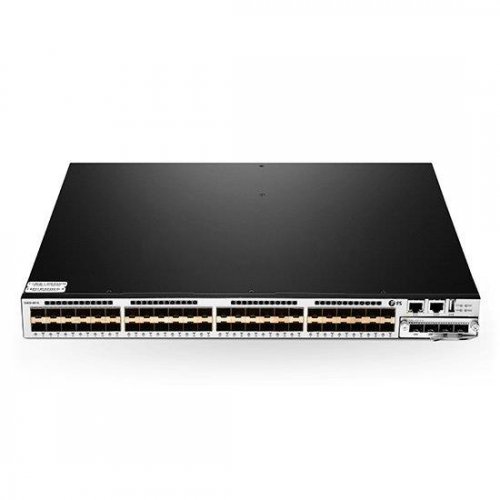
There are three main ways to connect switches: cascading, stacking, and clustering. Cascade mode is simple to implement, just an ordinary twisted pair can be, cost savings and basically not limited by the distance. The investment in the stacking method is relatively large and can only be connected within a short distance, which is difficult to achieve. Cluster connection means that multiple interconnected (cascaded or stacked) switches are managed as a logical device.

There are three main ways to connect switches: cascading, stacking, and clustering. Cascade mode is simple to implement, just an ordinary twisted pair can be, cost savings and basically not limited by the distance. The investment in the stacking method is relatively large and can only be connected within a short distance, which is difficult to achieve. Cluster connection means that multiple interconnected (cascaded or stacked) switches are managed as a logical device.

tr
The stacking mode has better performance than the cascaded mode, and the signal is not easily depleted. Through the stacking mode, multiple switches can be managed in a centralized manner, which greatly reduces the management workload. If you really need to use cascading, you can also use the Uplink port. Connection method. Because this can guarantee the signal intensity to the greatest extent, if it is the connection between ordinary ports, it will certainly make the network signal seriously damaged.

1. Switch cascading
This is the most common way to connect multiple switches. It connects through the UpLink on the switch. It should be noted that the switches cannot be cascaded without limitation. Cascading over a certain number of switches will eventually cause broadcast storms, which will lead to a serious drop in network performance. Cascading is further divided into using ordinary port cascading and using Uplink port cascading.


2

1.1. Use ordinary port cascading

The so-called ordinary port is through a switch of a common port (such as RJ-45 port) to connect.
In the past, it was necessary to use the reverse connection. Now the two ends of the network cable are 568b line sequence. The jumper line is 568a line and 568b line sequence. According to the need, the old version of the device will distinguish the direct line from the crossover line. Now the devices are all common. What kind of consequences, the switch can automatically identify, and only the line can be wrong.


1.2 Use Uplink port cascading

In all switch ports, an Uplink port is included next to it. This port is provided exclusively for upstream connections. Simply connect the port to a port on the other switch except for the “Uplink port” through a straight-through twisted pair (note that it is not the Uplink port that is connected to each other).

33

2. Switch stack
This type of connection is mainly used in large networks where port requirements are relatively large. The stacking of switches is the quickest and most convenient way to expand ports. At the same time, the bandwidth after stacking is several-tenths of the speed of a single switch port. But not all switches support stacking, depending on whether the switch’s brand or model supports stacking. It is mainly connected through a dedicated connection cable provided by the manufacturer from the “UP” stack port of one switch to the “DOWN” stack port of another switch. All switches in a stack can be managed as a single switch.

Stacked switches are limited by the type and mutual distance. First, the stack switches must support stacking; in addition, the stacked connection cables provided by the manufacturers are generally around 1M, so the stacking function can only be used within a short distance.

34

3. Cluster
In the so-called cluster, multiple interconnected (cascaded or stacked) switches are managed as a logical device. In a cluster, there is generally only one switch that functions as a management switch,which is called a command switch. It can manage several other switches. In the network, these switches only need to occupy one IP address (only required by the command switch). Under unified management of the command switch, multiple switches in the cluster work together to greatly reduce management intensity.

It should be noted that different manufacturers have different implementations for clusters, and generally manufacturers use proprietary protocols to implement clusters. This determines the cluster technology has its limitations. Switches of different manufacturers can be cascaded but cannot be clustered.

444
Switching, stacking, and clustering are three different technologies. Cascading and stacking are prerequisites for implementing clusters. Clusters are used for cascading and stacking; cascading and stacking are implemented based on hardware; clusters are implemented based on software; cascading and stacking are sometimes similar (especially cascading and virtual Stacking), sometimes very different (cascade and real stacking).Please feel free to contact Fiber-Mart if you have any needs or questions.we will provide you with the most professional service.

Singlemode fiber and multimode fiber different and selection method(2)

The application of fiber optics is being gradually extended from the trunk or the computer room to the desktop and residential users, which means that more and more users who do not understand the characteristics of the fiber have come into contact with the fiber optic system. Therefore, when designing fiber link systems and selecting products, full consideration should be given to the current and future application requirements of the system, use of compatible systems and products, the greatest possible ease of maintenance and management, and adaptation to the ever-changing field conditions and user installation requirements.

yt

1. Can a fiber optic connector be terminated directly on a 250 μm fiber?  


Loose sleeve fiber optic cable contains bare fiber with an outer diameter of 250 μm, which is very small and fragile. It is unable to fix the fiber and is not enough to support the weight of the fiber optic connector and is very insecure. The connector is terminated directly on the fiber optic cable. At a minimum, a 900 μm tight jacket is required to wrap around the 250 μm fiber to protect the fiber and support the connector.

2. Can the FC connector be connected directly to the SC connector?

Yes, this is just a different connection method for two different types of connectors.
If you need to connect them, you must select a mixed adapter and use the FC/SC adapter to connect the FC connector and the SC connector at both ends. This method requires that the connectors should all be flat ground. If you absolutely need to connect APC connectors, you must use a second method to prevent damage.

The second method is to use a hybrid jumper and two connection adapters. Hybrid patch cords use different types of fiber connectors at both ends. These connectors will connect to the place where you need to connect. In this way, you can use a universal adapter to connect the system in the patch panel, but bring the system budget to budget. The increase in the number of connector pairs.

3. The fixed connection of optical fibers includes mechanical optical fiber connection and thermal welding. What are the selection principles for mechanical optical fiber connection and thermal welding?

Mechanical fiber optic connection, commonly known as fiber optic cold connection, refers to an optical fiber connection method in which a single or multi-fiber optical fiber is permanently connected through a simple connection tool and a mechanical connection technology without the need of a thermal fusion bonding machine. In general, mechanical splices should be used in place of thermal fusion when splices are made at a small number of cores dispersed at multiple locations.

yty
Mechanical fiber optic connection technology is often used in engineering practices such as line repairs and small-scale applications in special occasions. In recent years, with the large-scale deployment of fiber-to-the-desktop and fiber-to-the-home (FTTH), it has been recognized that mechanical fiber optic connection is an important means of fiber optic connection.

For fiber-to-the-desktop and fiber-to-the-home applications with a large number of users and geographically dispersed features, when the scale of the users reaches a certain level, the construction complexity and construction personnel and fusion splicer cannot meet the time requirements for users to open services. Because of the simple operation, short training cycle, and low equipment investment, the mechanical fiber connection method provides the most cost-effective solution for optical fiber connection for large-scale deployment of optical fibers. For example, in the high corridors, narrow spaces, insufficient lighting, inconvenient on-site power and other occasions, mechanical fiber optic connection provides a convenient, practical, fast and high-performance optical fiber continuation means for design, construction and maintenance personnel.

ytyy

 4. What is the difference between fiber optic splice enclosure requirements and fiber optic splice closures used in telecom operators’ outdoor lines in fiber-to-the-home systems?

First of all, in the fiber-to-the-home system, it is necessary to reserve the position of the optical splitter installation and termination, accommodation, and protection of the jumper to and from the optical splitter in the joint box according to actual needs. Because the actual situation is that the optical splitter may be located in the cable joint box, optical cable transfer box, wiring box, ODF and other facilities, and in which the optical cable termination and distribution.

Secondly, for residential quarters, the optical fiber cable splice box is installed in a buried manner. Therefore, the optical cable splice box has higher requirements for buried performance.

In addition, in the fiber-to-the-home project, it may be necessary to consider the entry and exit of a large number of small-core optical cables.

Singlemode fiber and multimode fiber different and selection method(1)

1.What is singlemode and multimode fiber? What is the difference between them?

The concept of single-mode and multi-mode is to classify fibers according to the propagation mode—the concept of multi-mode fiber and single-mode fiber propagation mode. We know that light is an extremely high-frequency (3×10¹⁴Hz) electromagnetic wave. When it propagates in an optical fiber, it is found from theories of wave optics, electromagnetic fields, and Maxwell equations.

When the fiber core has a geometric dimension much larger than the wavelength of the light, the light will propagate in the fiber in dozens or even hundreds of propagation modes, such as TMmn mode, TEmn mode, HEmn mode, etc. (where m, n=0, 1, 2, 3, …).

Among them, the HE11 mode is called the basic mode, and the rest are all called high-order modes.

Multimode fiber

When the fiber’s geometric size (mainly the core diameter d1) is far greater than the wavelength of light (about 1μm), there will be dozens or even hundreds of propagation modes in the fiber. Different propagation modes have different propagation speeds and phases, resulting in delays and widening light pulses after long-distance transmission. This phenomenon is called the modal dispersion of the fiber (also called inter-modal dispersion).

Mode dispersion can narrow the bandwidth of multimode fiber and reduce its transmission capacity. Therefore, multimode fiber is only suitable for smaller-capacity fiber communication.

The refractive index distribution of a multimode fiber is mostly a parabolic distribution, ie, a graded index profile. Its core diameter is about 50μm.

图片1

Single Mode Fiber

When the fiber’s geometry (mainly the core diameter) can be similar to the wavelength of light, if the core diameter d1 is in the range of 5~10μm, the fiber only allows one mode (base mode HE11) to propagate in it, and all other high-order modes are all cut off. This kind of fiber is called single-mode fiber.
Since it only has one mode to propagate and avoids the problem of mode dispersion, single-mode fiber has a very wide bandwidth and is particularly suitable for large-capacity optical fiber communications. Therefore, in order to achieve single-mode transmission, the parameters of the fiber must satisfy certain conditions. Through formulae calculations, for a fiber with NA=0.12, single-mode transmission above λ=1.3 μm, the radius of the fiber core should be ≤ 4.2 μm, ie its core diameter d1 ≤ 8.4 μm.
Because the core diameter of a singlemode fiber is very small, more stringent requirements are imposed on its manufacturing process.

2.What are the advantages of using optical fiber?

1) The passband of the fiber is very wide and the theory can reach 30T.
2) The length of non-relay support is up to tens to hundreds of kilometers, and the copper wire is only a few hundred meters.
3) Not affected by electromagnetic fields and electromagnetic radiation.
4) Light weight and small size.
5) Optical fiber communication is not powered, and the use of safety can be used in flammable, volatile and other places.
6) The use of a wide range of ambient temperatures.
7) Long service life.

图片2

3.how to choose the optical cable?

In addition to selecting the number of optical fiber cores and optical fibers, the optical cable must be selected according to the use environment of the optical cable to select the structure of the optical cable and the outer sheath.

1) Optical cable for outdoor use When loosely buried, it is better to use loose-sheathed cable. When overhead, a loose PE cable with a black PE sheath with two or more ribs can be used.
2) Optical fiber cables used in buildings should use tight-fitting optical cables and pay attention to their fire-retardant, toxic and smoke characteristics. The type of flame-retardant but smoke (Plenum) or flammable and non-toxic type (LSZH) can be used in the pipeline or in forced ventilation. The type of flame-retardant, non-toxic and non-smoking (Riser) should be used in the exposed environment.
3) When vertical or horizontal cabling is installed in a building, it can be used when using tight-fit optical cable, distribution optical cable or branch optical cable that are common in the building.
4) Select single-mode and multi-mode optical cables based on network applications and optical cable application parameters. Usually, indoor and short-distance applications use multimode optical cables, while outdoor and long-distance applications use single-mode optical cables.

4.In the connection of optical fibers, how to choose different applications of fixed connection and active connection?

The active connection of the fiber is achieved through a fiber optic connector. An active connection point in the optical link is a clear split interface. In the choice of active connection and fixed connection, the advantages of fixed connection are reflected in lower cost, light loss, but less flexibility, and the active connection is the opposite. When designing the network, it is necessary to flexibly select the use of activities and fixed connections according to the entire link situation to ensure flexibility and stability, so as to give full play to their respective advantages. The active connection interface is an important test, maintenance, and change interface. The active connection is relatively easy to find the fault point in the link than the fixed connection, which increases the convenience of replacement of the faulty device, thereby improving system maintenance and reducing maintenance costs.

图片3

5.Fibers are getting closer to user terminals. What do you need to pay attention to when it comes to the meaning of “fiber to the desktop” and system design?

“Fiber-to-the-desktop” in the application of the horizontal subsystem, and the relationship between copper and copper cable is complementary and indispensable. Optical fiber has its unique advantages, such as long transmission distance, stable transmission, free from electromagnetic interference, high support bandwidth, and no electromagnetic leakage. These characteristics make the optical fiber play an irreplaceable role in some specific environments:
1) If the information point transmission distance is greater than 100m, if you choose to use copper cable. Replicators must be added or network equipment and weak rooms must be added to increase costs and hidden troubles. Using fiber can easily solve this problem.
2) There are a large number of sources of electromagnetic interference in specific work environments (such as factories, hospitals, air-conditioning rooms, power equipment rooms, etc.), and optical fibers can be operated stably without electromagnetic interference in these environments.
3) There is no electromagnetic leakage in the fiber. It is very difficult to detect the signal transmitted in the fiber. It is a good choice for places where the security level is relatively high (such as military, R&D, auditing, government, etc.).
4) The environment with high demand for bandwidth has reached more than 1G. Optical fiber is a good choice.

There are many differences between single-mode fiber and multi-mode fiber, and the selection method is not the same. Let’s talk about it today. For more details, please keep an eye on Singlemode fiber and multimode fiber different and selection method(2).